 BestTime
Foot traffic analysis means turning visit data into answers: when a place is busy, when it is quiet, how one day or venue compares to another, and what you should change as a result. To analyze foot traffic data, collect hourly busyness for your venue and a set of comparable venues, find the peaks and quiet hours, compare days and locations, and plan staffing, opening hours and marketing around what you find.
This guide covers the metrics that matter, where the data comes from, a step-by-step method and worked examples using BestTime forecasts. It ends with the limits you should keep in mind.
What foot traffic analysis answers
Most foot traffic questions fall into a few groups:
- Timing. When are we busiest? When are we empty? Which day of the week matters most?
- Comparison. Is our store busier than the one across town? Does a competitor peak at a different hour?
- Benchmarking. Is our Saturday pattern normal for a cafe, or is something off?
- Decisions. How many staff do we need at 6 PM on Friday? Should we open an hour earlier? When should the promotion run?
Write your question down before you collect any data. "When should we schedule a third person on weekends?" leads to a much more useful analysis than "let's look at foot traffic."
The metrics that matter
| Metric | What it tells you | Where to get it in BestTime |
|---|---|---|
| Hourly busyness (0-100) | How busy each hour of each day is, relative to the venue's busiest hour of the week | day_raw per day in the forecast |
| Peak hours | When a rush starts, when it tops out and when it ends | peak_hours with peak_start, peak_max, peak_end and peak_intensity |
| Busy and quiet hours | Hour ranges that are above or below normal for that day | busy_hours and quiet_hours |
| Day ranking | Which days are busiest, by peak and by average | day_rank_max and day_rank_mean in day_info |
| Arrival and departure | When most people come and when most leave | surge_hours with most_people_come and most_people_leave |
| Dwell time | How long visitors typically stay | venue_dwell_time_min, venue_dwell_time_max and venue_dwell_time_avg |
Visit counts versus relative busyness
There are two kinds of foot traffic numbers, and mixing them up causes most analysis mistakes.
Visit counts estimate how many people visited a place in a day, week or month. Providers such as Placer.ai and Advan Research model these from phone panels. They are useful for market share and year-over-year trends, but they come with contract pricing and are mostly about totals, not hours.
Relative busyness tells you how busy a venue is in a given hour compared with its own busiest hour of the week. That is what BestTime returns: a 0-100 score for every hour of every day. It is the right tool for timing questions, such as staffing, opening hours and the best time to visit. It is not a head count and not a share of capacity.
If your question is "when?", use relative busyness. If your question is "how many?", you need a visit count source, and you should check how it is modeled.
Where foot traffic data comes from
- Your own counters. Door sensors, Wi-Fi counts, thermal sensors or cameras count people at your own entrances. They are accurate for your locations but tell you nothing about competitors.
- Sales data. Transactions per hour are a good proxy for busy periods, but they miss people who browse and leave.
- Phone location panels. Providers aggregate anonymized phone location data to estimate visits to any public venue. Big names include Placer.ai, Advan Research, Pine59 (formerly Unacast's location insights), Veraset and Foursquare.
- Busyness forecasts. BestTime forecasts how busy any public venue will be for each hour of the week. The forecasts are built from anonymized, aggregated phone location data combined with other real-world signals such as weather, events and holidays. You can start free, and prices are published.
For a side-by-side look at providers, prices and data types, read the foot traffic data guide. If you want to test without paying, see free foot traffic data.
How to analyze foot traffic data, step by step
1. Define the question and the venues
Pick the question and list the venues you need: your own location, two to five direct competitors nearby, and a wider set for the category (for example all cafes in the neighborhood).
2. Collect the hourly forecasts
For a handful of venues, use the forecast tool on the BestTime website. For more, use the API. Each forecast returns the full week, so one call per venue is enough. A new forecast by name and address costs 2 credits; a refresh or query by venue ID costs 1 credit.
To build the comparison set without typing names, run a Venue Search for a query such as "coffee shops in Williamsburg Brooklyn". It finds matching venues and forecasts them in one go.
3. Find the peaks and quiet times per day
For each day, note the peak hour, how long the peak lasts and the quiet windows around it. A short, sharp peak at lunch needs a different plan than a slow build from 3 PM to 8 PM.
4. Compare the days of the week
Rank the days two ways: by their highest hour and by their average. They do not always agree. A day with a single sharp rush can have the highest peak but a low average, while a day that is steadily busy can rank first on average without ever reaching 100.
5. Compare venues in the same area
Put your venue next to its neighbors. Look for hours where they are busy and you are not. Those gaps can mean you open too late, close too early, or miss a group of customers your competitors reach.
6. Benchmark against the category
Compare your pattern with the typical pattern for your category in your city. If most cafes peak at 9 AM and yours peaks at 1 PM, that can be a strength (you own lunch) or a gap (you lose the morning crowd).
7. Turn patterns into decisions
- Staffing. Schedule your strongest team for the peak hours and the hour before them. Cut back in quiet windows.
- Opening hours. If the first hour after opening is always near zero, consider opening later. If the area is busy after you close, test staying open.
- Marketing. Run promotions in quiet hours to fill them, not in hours that are already full. Time social posts and ads for the hour before people usually arrive.
- Operations. Plan deliveries, cleaning and maintenance in the quietest windows.
8. Re-check regularly
Patterns shift with seasons, new competitors and road works. Refresh your forecasts every month or quarter and repeat the comparison.
Worked example 1: reading one venue's week
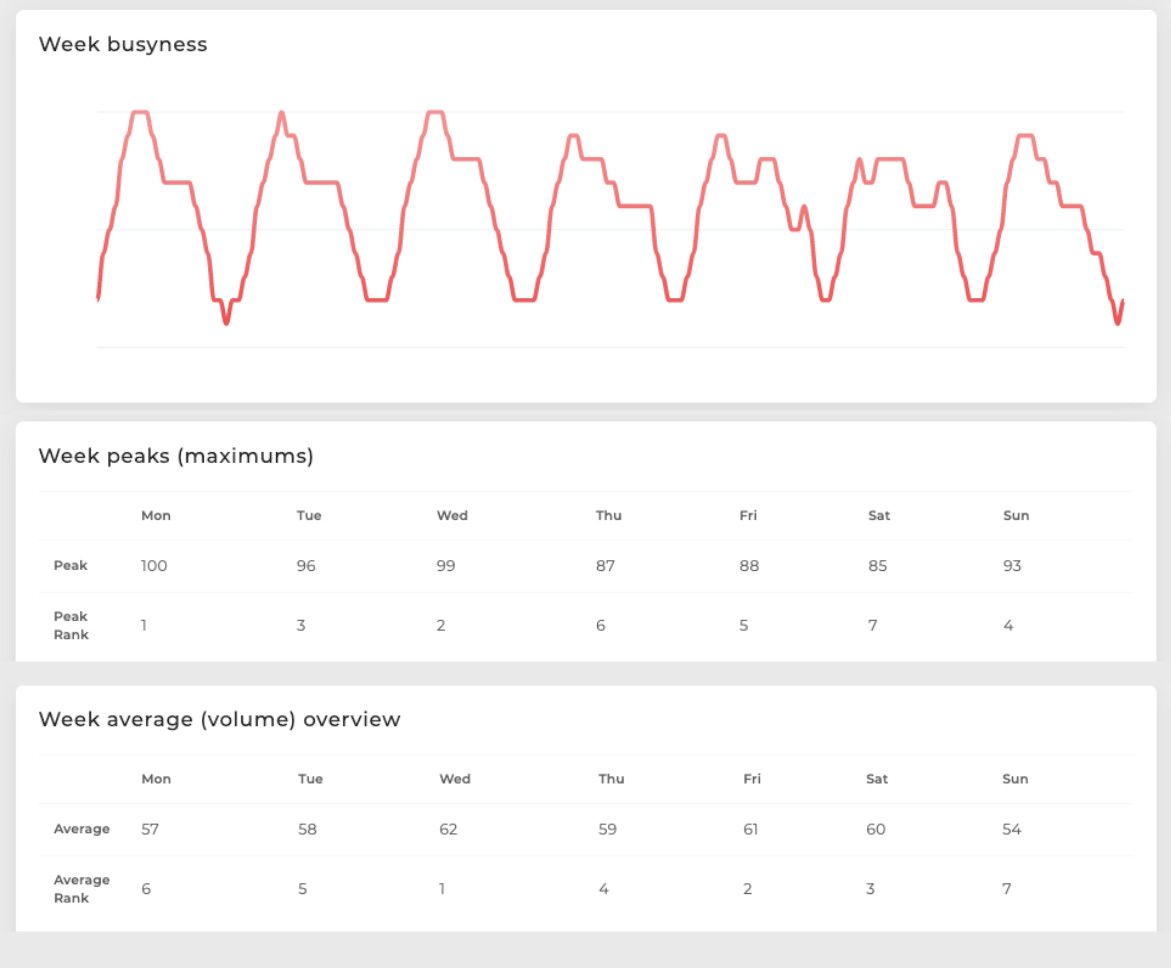 The week view for a sample venue: the busyness line, the peak per day with its rank, and the average per day with its rank.
This venue shows why you rank days two ways:
| Day | Peak | Peak rank | Average | Average rank |
|---|---|---|---|---|
| Monday | 100 | 1 | 57 | 6 |
| Tuesday | 96 | 3 | 58 | 5 |
| Wednesday | 99 | 2 | 62 | 1 |
| Thursday | 87 | 6 | 59 | 4 |
| Friday | 88 | 5 | 61 | 2 |
| Saturday | 85 | 7 | 60 | 3 |
| Sunday | 93 | 4 | 54 | 7 |
Monday has the single busiest hour of the week, but over the whole day it ranks sixth. Wednesday is near the top on both. What this means in practice:
- Put an extra person on Monday and Wednesday at the peak hour, when the rush is sharpest.
- Plan for a steady flow on Wednesday, Friday and Saturday, which carry the most traffic over the whole day.
- Sunday is the quietest day overall. It is the best day for stock counts or training.
Worked example 2: comparing venues in one area
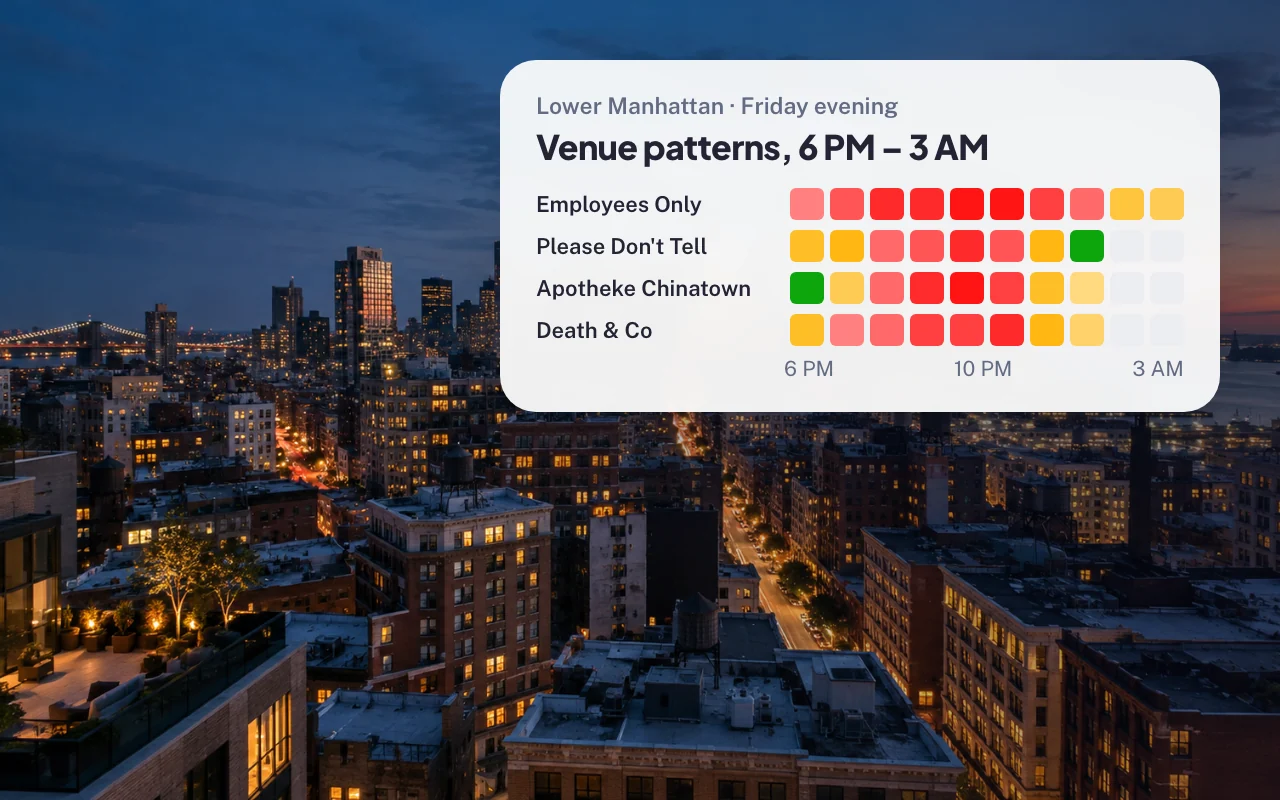 Four cocktail bars in Lower Manhattan on a Friday evening, hour by hour from 6 PM to 3 AM.
Four bars on the same night, four different shapes:
- Employees Only is already busy at 6 PM, stays red until after midnight and is still moderately busy at 3 AM. It owns the late crowd.
- Please Don't Tell builds from 7 PM, peaks around 10 PM and drops off quickly after midnight.
- Apotheke Chinatown is quiet at 6 PM and peaks between about 9 PM and 11 PM.
- Death & Co fills up early in the evening and is past its peak by midnight.
If you ran a new bar in this area, the gap is clear: few of these venues are at their peak in the early evening. An early happy hour could pull people who arrive before the others are full. If you ran Employees Only, you would staff for a long night, not a short peak.
Worked example 3: benchmarking against the category
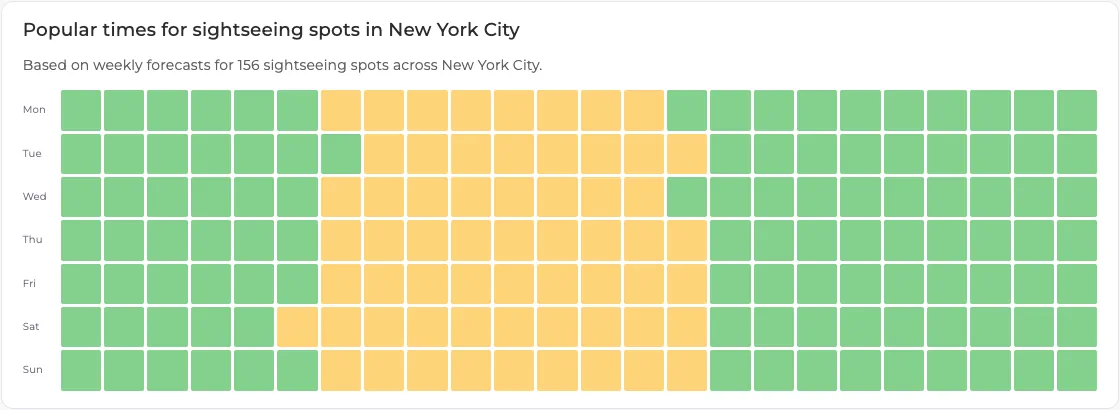 The combined week pattern for 156 sightseeing spots in New York City. Mornings and late evenings are green; the middle of the day is busier on every day of the week.
The heatmap above combines the forecasts of 156 sightseeing spots in New York City. It gives you a baseline: across the category, mornings and evenings are quiet and the middle of the day is busy, with the weekend window starting a little earlier.
Now compare one venue against it. Central Park is busiest around 3 PM on Saturday, and visitors usually stay up to 3 hours. Its busy window runs from late morning into the early evening, longer than the category baseline, and people stay for hours once they arrive. A food truck or tour operator working the park would plan for a long afternoon peak, not a short midday one.
You can build this kind of baseline for any city and category with the free city guides, for example sightseeing in New York City or restaurants in New York City.
Pulling the metrics with the API
To analyze more than a few venues, use the API. This Python example forecasts one venue and prints its peak and quiet hours per day:
import requests

params = {
    "api_key_private": "YOUR_PRIVATE_KEY",
    "venue_name": "McSorley's Old Ale House",
    "venue_address": "15 E 7th St, New York, NY 10003, United States",
}
response = requests.post("https://besttime.app/api/v1/forecasts", params=params)
data = response.json()

info = data["venue_info"]
print("Dwell time:", info.get("venue_dwell_time_min"), "to", info.get("venue_dwell_time_max"), "minutes")

for day in data["analysis"]:
    day_info = day["day_info"]
    peaks = [p["peak_max"] for p in day["peak_hours"]]
    print(day_info["day_text"], "| peak hour(s):", peaks,
          "| quiet hours:", day["quiet_hours"],
          "| rank by mean:", day_info["day_rank_mean"])
This costs 2 credits for the first forecast. Store the venue_id from the response and query it later for 1 credit. Hours use the 24-hour clock, and the BestTime day runs from 6 AM to 5 AM the next morning. See the API documentation for the full response.
For a fixed list of venues you check often, the Pro Venues plans give unlimited forecasts for a flat price: $96 per month for 50 venues, $119 for 100, $149 for 500 and $249 for 1,000. Pay-as-you-go starts at $29 per month for 1,200 credits, then $0.04 per credit. See pricing.
Limits of foot traffic data
- Relative, not absolute. A 0-100 score compares a venue with itself. Two venues at 100 can have very different crowds. Do not add or average scores across venues as if they were visitor counts.
- No head counts. BestTime does not return visitor numbers. If you need totals or market share, you need a visit count provider, and you should ask how the estimates are modeled.
- Public venues only. Forecasts cover places the public visits, such as shops, restaurants, bars, gyms, museums and parks. They do not cover private offices or homes.
- Not every venue has a forecast. Small or new venues may not have enough data yet.
- A forecast is a typical week. A one-off event, a closure or a sudden change in the area can make a single day differ from the forecast.
- Your own data still matters. Combine forecasts with your sales and staffing records. The forecast tells you when people are around; your sales tell you whether they buy.
Next steps
- Compare providers, data types and prices in the foot traffic data guide.
- See how gyms, libraries, retailers and staffing agencies use forecasts in foot traffic data for local businesses.
- Learn the 0-100 scale in detail in forecast venue busyness.
Questions
How do you analyze foot traffic data?
Start with a clear question, collect hourly busyness for your venue and a set of comparable venues, then find the peaks and quiet hours per day, compare days and venues, and turn the patterns into staffing, opening hours and marketing decisions.
What metrics are used in foot traffic analysis?
The core metrics are busyness by hour and day, peak hours, quiet hours, day rankings and dwell time. Some providers also estimate visit counts. BestTime gives relative busyness from 0 to 100 and dwell time, not visitor counts.
Can you predict foot traffic?
Yes. Foot traffic forecasts predict how busy a venue will be for each hour of the week based on past visit patterns. BestTime builds its forecasts from anonymized, aggregated phone location data combined with signals such as weather, events and holidays.
Where can I get retail foot traffic data?
Your own door counters and sales data cover your own stores. For competitors and other public venues you need a third-party provider. BestTime forecasts any public venue and you can start free; Placer.ai and Advan Research sell visit estimates on contract plans.
Is foot traffic busyness the same as the number of visitors?
No. A relative busyness score of 100 means the venue's own busiest hour of the week. It does not tell you how many people are inside, and two venues at 100 can have very different crowd sizes.
BestTime in 47 seconds
See how busy any place gets, hour by hour
BestTime forecasts how busy a venue gets for every hour of the week, from anonymized, aggregated phone location data combined with weather, events and holidays. Look up one venue, compare a whole city, or use the API.
Try BestTime for free
Create a free account without a credit card, forecast a few venues you know, and see their busy and quiet hours for every day of the week.
Start free See pricing