 BestTime
You can build an app that shows the busiest bars around a user in an afternoon by pairing an AI coding assistant with the BestTime foot traffic API. The assistant writes the code. BestTime supplies the data: for every bar, a forecast of how busy it is at each hour of the week, from 0 to 100 relative to its own peak. One Venue Filter call returns the bars near a point that are forecast to be busy on the night and hours your user picks.
This guide gives you the plan, the prompts, the core code and the costs. It works with any assistant that can edit files and run commands, such as Claude Code or Cursor.
What you are building
A mobile-friendly web app with three parts:
- A picker for day and time: "Tonight", "Friday 10 PM", "Saturday late".
- A map with bar pins colored by forecast busyness: green for quiet, orange for lively, red for packed.
- A list under the map, busiest first, with each bar's hourly forecast for the evening.
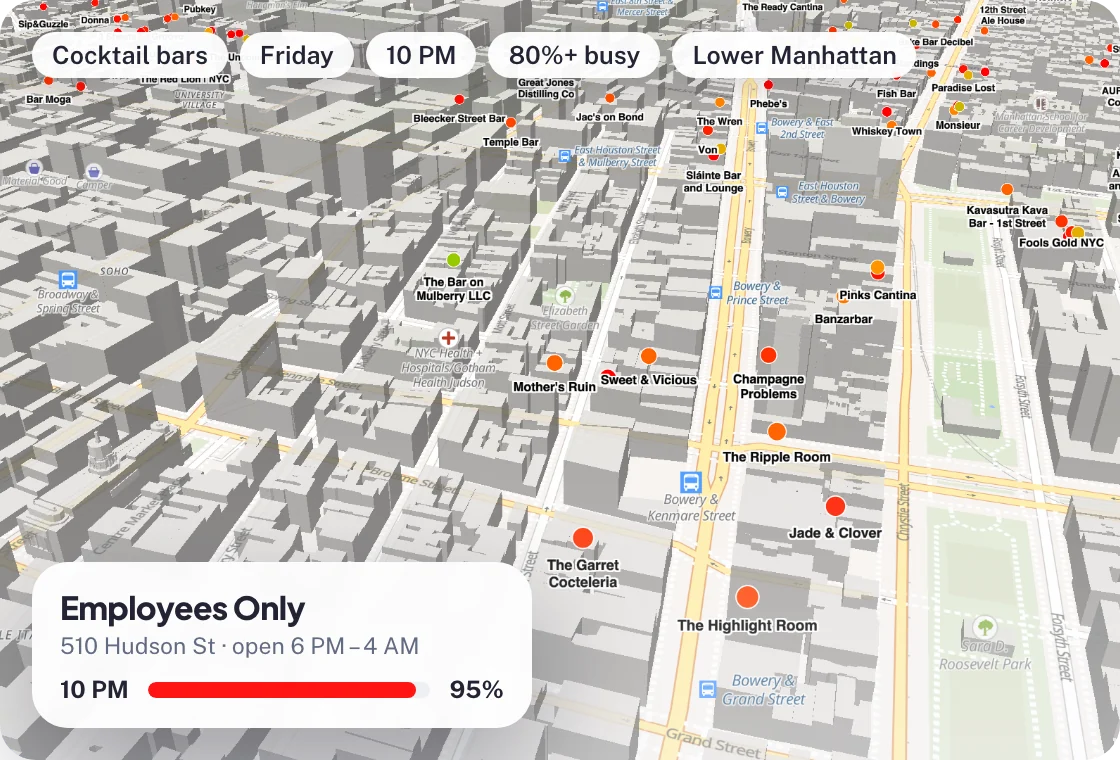 The target experience: bars filtered to 80% or more of their peak on Friday at 10 PM, colored by forecast busyness.
The app shows forecasts, not a feed of current visitors. That is a feature for planning: users can check next Friday as easily as tonight. Write copy like "usually packed at 10 PM", and avoid "people here now".
The stack
Keep it small so the assistant can hold the whole project in mind:
- Server: Node.js with Express, or Python with FastAPI. It holds your BestTime key and caches responses.
- Front end: one HTML page with Leaflet and OpenStreetMap tiles, or React with Mapbox if you prefer.
- Data: the BestTime Venue Filter API.
- Hosting: any platform that runs a small Node or Python server.
You do not need a database for the first version. An in-memory cache is enough.
Step 1: Get a key and test one call
Create a free BestTime account. No credit card is needed. Copy your private API key from the API keys page and put it in a .env file:
BESTTIME_PRIVATE_KEY=pri_your_key_here
Test a call before you write any app code. This asks for bars within 1.5 km of Washington Square Park that are at least 60% busy at some point between 9 PM and midnight on Friday:
curl --request GET "https://besttime.app/api/v1/venues/filter?api_key_private=$BESTTIME_PRIVATE_KEY&lat=40.731&lng=-73.997&radius=1500&types=BAR,CLUBS&day_int=4&hour_min=21&hour_max=0&busy_min=60&order_by=22&order=desc&foot_traffic=both"
Each venue in the response has venue_name, venue_address, venue_lat, venue_lng, rating, price_level, day_raw (the selected hours) and day_raw_whole (all 24 hours from 6 AM). Paste a trimmed response into your assistant later so it knows the exact shape.
If you want the details of each parameter, the Venue Filter API tutorial covers them.
Step 2: Give the assistant a clear brief
AI assistants work best with a short spec, the real response shape and firm rules. Start a new project folder and use a first prompt like this:
Build a small web app called "Busy Bars".

Server: Node.js + Express. One endpoint: GET /api/bars?lat=&lng=&day=&hour=
- Call https://besttime.app/api/v1/venues/filter with:
  api_key_private from process.env.BESTTIME_PRIVATE_KEY,
  lat, lng (round to 3 decimals), radius=1500, types=BAR,CLUBS,
  day_int=day (0=Monday..6=Sunday), hour_min=hour, hour_max=(hour+2)%24,
  busy_min=50, order_by=hour, order=desc, foot_traffic=both.
- Return only: id, name, address, lat, lng, rating, price_level,
  busyAtHour (the value for the requested hour), dayRaw (day_raw_whole).
- Cache responses in memory for 30 minutes, keyed by the rounded lat/lng, day and hour.
- Never send the API key to the browser.

Front end: one page, Leaflet with OpenStreetMap tiles.
- Ask for the user's location, fall back to a default city center.
- Day and hour pickers, default to today at 10 PM.
- Pins colored by busyAtHour: <40 green, 40-74 orange, >=75 red.
- List under the map, busiest first, with a small bar chart of dayRaw from 6 PM to 3 AM.

Notes on the data:
- day_raw_whole has 24 values. Index 0 is 6 AM, index 23 is 5 AM the next day.
  So hour h is at index (h - 6) mod 24.
- Values are 0-100 relative to each bar's own weekly peak. Not head counts.
  Label them "usually quiet", "lively", "usually packed".

Here is a trimmed real response: <paste JSON>
Ask for a plan first, read it, then let the assistant write the files.
Step 3: The core server code
Your assistant will produce something close to this. Read it and check the parameters against the docs.
import express from "express";

const app = express();
const KEY = process.env.BESTTIME_PRIVATE_KEY;
const cache = new Map();
const TTL_MS = 30 * 60 * 1000;

const indexForHour = (hour) => (hour - 6 + 24) % 24; // day array starts at 6 AM

app.get("/api/bars", async (req, res) => {
  const lat = Number(req.query.lat).toFixed(3);
  const lng = Number(req.query.lng).toFixed(3);
  const day = Number(req.query.day);    // 0 = Monday ... 6 = Sunday
  const hour = Number(req.query.hour);  // 0 ... 23

  const cacheKey = `${lat},${lng},${day},${hour}`;
  const hit = cache.get(cacheKey);
  if (hit && Date.now() - hit.at < TTL_MS) return res.json(hit.bars);

  const params = new URLSearchParams({
    api_key_private: KEY,
    lat, lng, radius: "1500",
    types: "BAR,CLUBS",
    day_int: String(day),
    hour_min: String(hour),
    hour_max: String((hour + 2) % 24),
    busy_min: "50",
    order_by: String(hour),
    order: "desc",
    foot_traffic: "both",
  });

  const response = await fetch(`https://besttime.app/api/v1/venues/filter?${params}`);
  const data = await response.json();
  if (data.status !== "OK") {
    return res.status(502).json({ error: data.message || "No bars found" });
  }

  const bars = data.venues.map((v) => ({
    id: v.venue_id,
    name: v.venue_name,
    address: v.venue_address,
    lat: v.venue_lat,
    lng: v.venue_lng,
    rating: v.rating,
    price_level: v.price_level,
    busyAtHour: v.day_raw_whole[indexForHour(hour)],
    dayRaw: v.day_raw_whole,
  }));

  cache.set(cacheKey, { at: Date.now(), bars });
  res.json(bars);
});

app.use(express.static("public"));
app.listen(3000);
Things to check in what your assistant writes:
- The day index. The single most common bug is treating index 0 as midnight. Index 0 is 6 AM.
- The parameter names. Venue Filter uses
hour_minandhour_max. Assistants sometimes invent names likehourorhour_int. The API will ignore or reject those. - No
limitwithbusy_min. The busyness filter runs afterlimit, so a small limit can hide results. Trim the list on your side. - The key stays on the server. Search the front-end bundle for
pri_before you deploy.
Step 4: Iterate on the experience
Once the map works, small prompts get you a long way:
- "Add quick buttons: Tonight 10 PM, Tomorrow 10 PM, Saturday midnight."
- "Add a Quiet mode that uses busy_max=40 and busy_conf=all instead of busy_min=50."
- "Show the peak hour for each bar in the list, taken from the highest value in dayRaw between 6 PM and 3 AM."
- "Add a filter for rating 4.0 and up, passed to the API as rating_min."
- "Show price level as dollar signs, and hide it when price_level is 0."
Test each change on a real city at a real hour. Check one bar by hand against its forecast in your BestTime account or in the free New York bars guide.
Step 5: Add bars that are missing
Venue Filter searches the whole BestTime database for accounts created after July 25, 2024. If a neighborhood looks thin, add venues with Venue Search: a query like "bars in Williamsburg Brooklyn" finds and forecasts matching bars in the background. After that they appear in your filter results.
Forecasts describe a typical week. Refresh the bars you care about every 2 to 4 weeks with the New Forecast endpoint.
What it costs
Venue Filter costs 1 credit per 10 venues returned. A map with 30 bars costs 3 credits per uncached request.
| Usage | Credits per month |
|---|---|
| 1,000 uncached map loads of 30 bars | 3,000 |
| With a 30-minute cache and 80% hits | about 600 |
Plans:
- Free test account for building and testing.
- Basic Usage: $29 per month including 1,200 credits, then $0.04 per credit. The cached example above fits inside it.
- Pro Venues: unlimited forecasts for a fixed list of venues, $96 per month for 50 venues, $119 for 100, $149 for 500 and $249 for 1,000. Good when you curate a fixed set of bars per city.
See pricing for details.
Ideas for version two
- Saved favorites with a weekly digest: "Your favorite bars are usually busiest at 11 PM on Saturday."
- A "best time to go" badge that picks the hour before the peak, from the peak hours in the full forecast.
- Curated groups such as live music or sports bars, using collections in Venue Filter.
- City guide pages that list the busiest bars per night for SEO. See city guides and venue recommendation sites.
Next steps
- Learn every filter in the Venue Filter API tutorial.
- Read about the data for bars in foot traffic for nightlife and bars.
- Start from the basics in the beginner's guide to the foot traffic data API.
Questions
Can I build a busy bars app without a backend developer?
Yes. An AI coding assistant can write a small server and a map page for you. You still need to read the code it writes, keep your API key on the server and test the results.
Which BestTime endpoint should a busy bars app use?
Venue Filter. One call returns the bars in an area that are forecast to be busy on a chosen day and hours, sorted and ready to show on a map.
What does a busy bars app cost to run?
Venue Filter costs 1 credit per 10 venues returned. A search that shows 30 bars costs 3 credits. With caching, a small app fits in Basic Usage at $29 per month including 1,200 credits.
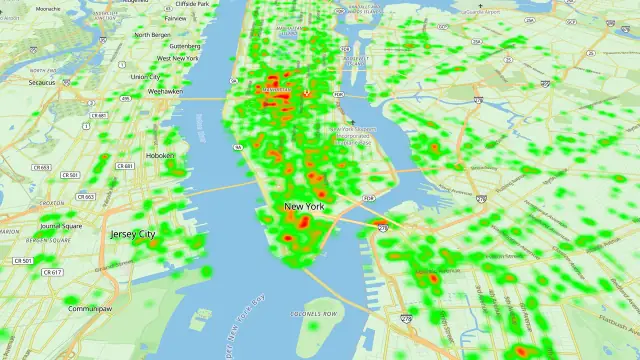
BestTime in 47 seconds
See how busy any place gets, hour by hour
BestTime forecasts how busy a venue gets for every hour of the week, from anonymized, aggregated phone location data combined with weather, events and holidays. Look up one venue, compare a whole city, or use the API.
Try BestTime for free
Create a free account without a credit card, forecast a few venues you know, and see their busy and quiet hours for every day of the week.
Start free See pricing