 BestTime
To filter venues by predicted foot traffic, first find them with the Venue Search API, then filter the results with Venue Filter. Venue Search takes a query such as "bars in Austin TX", finds matching places and forecasts each one. The finished search gives you a collection_id and a ready-made Venue Filter link, so you can keep only the venues that are busy, or quiet, on the day and hours you choose.
This tutorial covers the full flow with Python and cURL: the search request, polling the progress endpoint, reading the results, and filtering them. If you are new to the API, start with the beginner's guide to the foot traffic data API.
How Venue Search works
Venue Search is a background job with three parts:
- Search.
POST /api/v1/venues/searchstarts the job and returns ajob_id, acollection_idand a progress link right away. - Forecast. In the background, BestTime finds venues that match your query and runs a forecast for each one. Venues with enough data are added to your account and to the collection.
- Progress and results.
GET /api/v1/venues/progressreports how far the job is. When it finishes, it returns the venues, their hourly forecasts and links to filter them.
Use Venue Search when you do not know the venue names yet, or when you want a whole category in an area. For one known venue, the New Forecast endpoint (POST /api/v1/forecasts with venue_name and venue_address) is faster.
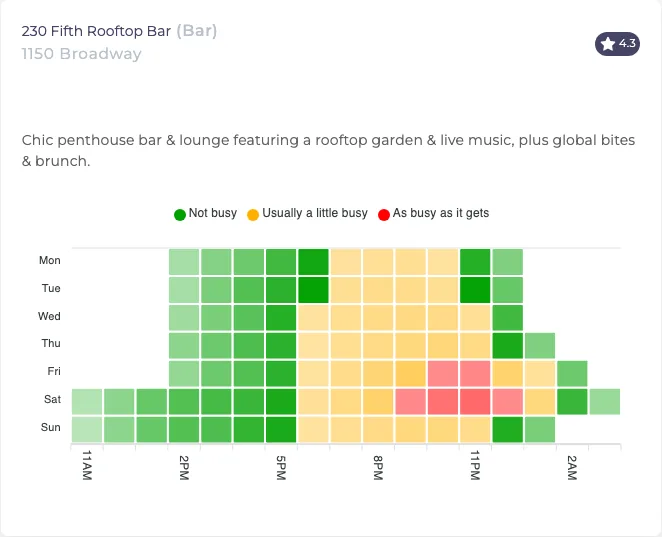 Every venue the search returns comes with its own forecast, like this week heatmap for a New York bar.
Step 1: Start a search
Send a POST request with your private key and a query. The query combines a venue type or name with a location.
import os
import requests

BASE = "https://besttime.app/api/v1"
KEY = os.environ["BESTTIME_PRIVATE_KEY"]

r = requests.post(
    f"{BASE}/venues/search",
    params={
        "api_key_private": KEY,
        "q": "supermarkets in sydney australia",
        "num": 40,
        "format": "raw",
    },
    timeout=30,
)
job = r.json()
print(job)
The same with cURL:
curl --request POST "https://besttime.app/api/v1/venues/search?api_key_private=$BESTTIME_PRIVATE_KEY&q=supermarkets%20in%20sydney%20australia&num=40&format=raw"
The response arrives in about a second:
{
  "_links": {
    "venue_search_progress": "https://besttime.app/api/v1/venues/progress?job_id=e0880f28-3a19-4871-a355-4ca21f10c2c8&collection_id=col_ac734e76ad2d4696a5a66541c67587e8&format=raw"
  },
  "collection_id": "col_ac734e76ad2d4696a5a66541c67587e8",
  "job_id": "e0880f28-3a19-4871-a355-4ca21f10c2c8",
  "status": "OK"
}
Search parameters
| Parameter | Required | What it does |
|---|---|---|
api_key_private |
yes | Your private key. |
q |
yes | Venue name or type plus a location, up to 128 characters. Examples: "Whole Foods Market San Francisco", "museums in Amsterdam", "gyms in Brooklyn". |
num |
no | Maximum results: 20, 40 or 60. Default 20. More results take longer. |
format |
no | Forecast format in the final results: raw (hourly values for every day, the default), all (full analysis per venue) or none (no forecast, smaller response). |
opened |
no | all (default), 24 for venues open 24 hours, or now for venues open at this moment. |
collection_id |
no | Add the results to an existing collection instead of a new one. |
lat, lng, radius |
no | Search around a point, radius in meters. Use this to search near a user, with q set to just "bars" or "pharmacy". |
A location is needed in q unless you pass lat, lng and radius.
Step 2: Add filters in plain language
Venue Search reads simple filter phrases from the query. It removes them from the search text and turns them into Venue Filter parameters on the result links. For example:
busy bars in Austin TX on friday from 9 pm until 11 pm
searches for "bars in Austin TX" and sets these filters:
| Phrase | Filter |
|---|---|
| busy (or crowded) | busy_min=50, busy_max=100 |
| quiet | busy_min=0, busy_max=50 |
| minimum 70% busy | busy_min=70 |
| on friday | day_int=4 |
| from 9 pm until 11 pm | hour_min=21, hour_max=23 |
| friday morning | day_int=4, hour_min=6, hour_max=11 |
| friday afternoon | hour_min=12, hour_max=17 |
| friday evening | hour_min=18, hour_max=0 |
| friday night | hour_min=21, hour_max=5 |
So "quiet supermarkets in Sydney Australia on sunday morning" finds supermarkets in Sydney and prepares a filter for venues at or below 50% of their peak between 6 AM and 11 AM on Sunday.
These phrases do not shrink the search itself. Venue Search still finds and forecasts every matching venue. The filters apply when you open the results through Venue Filter in step 4. That way you can change the filter later without searching again.
Step 3: Poll the progress endpoint
Call the progress link until job_finished is true. The endpoint takes the job_id, and optionally the collection_id and format.
import time

progress_url = job["_links"]["venue_search_progress"]

while True:
    progress = requests.get(progress_url, timeout=30).json()
    if progress.get("job_finished"):
        break
    print(progress["count_completed"], "of", progress["count_total"], "processed")
    time.sleep(5)
While the job runs, the response shows counters:
{
  "collection_id": "col_ac734e76ad2d4696a5a66541c67587e8",
  "count_completed": 12,
  "count_failure": 0,
  "count_forecast": 10,
  "count_total": 40,
  "job_finished": false,
  "job_id": "e0880f28-3a19-4871-a355-4ca21f10c2c8",
  "status": "OK"
}
count_total: venues found so far. It can grow until it reachesnum, or stop lower if fewer venues match.count_completed: venues processed.count_forecast: venues with a forecast.count_failure: venues that hit an error. Venues without enough data are not counted here.
Poll every 3 to 5 seconds. Venue Search allows 30 requests per minute and 300 per hour, so do not start new searches in a tight loop.
Step 4: Read the results
When the job is done, the same endpoint returns the venues. This trimmed example from the API documentation is a finished search for "quiet supermarkets in sydney australia sunday morning":
{
  "job_finished": true,
  "collection_id": "col_5c546908473645c1b9bad36b7fef7765",
  "count_total": 200,
  "count_forecast": 181,
  "venues_n": 200,
  "bounding_box": {
    "lat": -33.8627418, "lng": 151.2165809,
    "lat_min": -33.8877752, "lat_max": -33.8377084,
    "lng_min": 151.1962989, "lng_max": 151.2368629,
    "map_zoom": 14, "radius": 6712
  },
  "venues": [
    {
      "forecast": false,
      "processed": true,
      "venue_id": "ven_6372542d36476a8759686d52676b646155646e713661514a496843",
      "venue_name": "Kings Wharf Supermarket",
      "venue_address": "21 Shelley St, Sydney NSW 2000, Australia"
    },
    {
      "forecast": true,
      "processed": true,
      "venue_id": "ven_9372542d36476a8759686d52676b646155646e713661514a496847",
      "venue_name": "Maloneys Grocer",
      "venue_address": "4/490 Crown St, Surry Hills NSW 2010, Australia",
      "venue_foot_traffic_forecast": [
        {
          "day_int": 0,
          "day_info": { "day_text": "Monday", "day_max": 25, "day_mean": 12, "day_rank_max": 6, "day_rank_mean": 7 },
          "day_raw": [5, 5, 5, 10, 15, 20, 20, 25, 25, 20, 15, 10, 5, 5, 0, 0, 0, 0, 0, 0, 0, 0, 0, 0]
        }
      ]
    }
  ],
  "_links": {
    "venue_filter_api": "https://besttime.app/api/v1/venues/filter?lat_min=-33.8877752&lat_max=-33.8377084&lng_min=151.1962989&lng_max=151.2368629&collection_id=col_5c546908473645c1b9bad36b7fef7765&api_key_private=...&busy_min=0&busy_max=50&day_int=6&hour_min=6&hour_max=11",
    "radar_tool": "https://besttime.app/api/v1/radar/filter?..."
  }
}
(That example ran with an older, higher num limit. Today a search returns up to 60 venues.)
What each part is for:
venueslists every match. Checkforecast: Kings Wharf Supermarket hasfalse, so it was found but has too little data for a forecast.venue_foot_traffic_forecastholdsday_infoand 24day_rawvalues per day when you usedformat=raw. Index 0 is 6 AM, index 23 is 5 AM the next morning.bounding_boxfits all results, with a center point, zoom and radius you can pass straight to a map._links.venue_filter_apiopens the results in Venue Filter. Notice that the words "quiet", "sunday" and "morning" becamebusy_max=50,day_int=6,hour_min=6andhour_max=11._links.radar_toolopens the same results on the map in your account.
To print the five quietest supermarkets at 9 AM on Sunday from the raw results:
SUNDAY, NINE_AM_INDEX = 6, 3  # 9 AM is 3 hours after 6 AM

rows = []
for v in progress["venues"]:
    if not v.get("forecast"):
        continue
    sunday = next(d for d in v["venue_foot_traffic_forecast"] if d["day_int"] == SUNDAY)
    rows.append((sunday["day_raw"][NINE_AM_INDEX], v["venue_name"]))

for value, name in sorted(rows)[:5]:
    print(f"{value:>3}  {name}")
This works for a quick look. For real filtering and sorting, let the API do it in the next step.
Step 5: Filter the results by predicted foot traffic
Venue Filter returns only the venues that match your conditions, already sorted. Pass the collection_id to limit it to your search results:
r = requests.get(
    f"{BASE}/venues/filter",
    params={
        "api_key_private": KEY,
        "collection_id": progress["collection_id"],
        "day_int": 6,         # Sunday
        "hour_min": 8,        # 8 AM
        "hour_max": 11,       # 11 AM
        "busy_max": 40,       # at most 40% of the venue's weekly peak
        "busy_conf": "all",   # in every selected hour
        "order_by": "9",      # sort by the forecast at 9 AM
        "order": "asc",
    },
    timeout=60,
)
result = r.json()
for v in result["venues"]:
    print(v["venue_name"], v["day_raw"])
Each venue comes back with day_raw for 8 AM to 11 AM only, plus rating, reviews, price level, type, coordinates and dwell time. The window object tells you which day and hours the values cover.
Flip it to find lively places. On a search for bars, day_int=4, hour_min=21, hour_max=23 and busy_min=70 keep only bars forecast at 70% or more of their peak at some point between 9 PM and 11 PM on Friday. With the default busy_conf=any, one matching hour is enough. With all, every hour must match.
Venue Filter has many more options: venue types, rating, reviews, price, bounding boxes, sorting by any hour, paging, and combining collections. They are all in the Venue Filter API tutorial. For use-case recipes, see the guide to filtering public businesses by foot traffic.
Step 6: Get the full analysis for one venue
The search results include hourly values, not peaks or quiet hours. For one venue's complete forecast, query it by venue_id with your public key:
curl --request GET "https://besttime.app/api/v1/forecasts/week?api_key_public=$BESTTIME_PUBLIC_KEY&venue_id=ven_9372542d36476a8759686d52676b646155646e713661514a496847"
This query is free within one day after the venue was forecast. Or run the search with format=all to get the full analysis for every venue in the results.
Credits for Venue Search
| Part | Credits |
|---|---|
| The search itself | a small charge per 20 results found (see the credits table) |
| Each venue that gets a forecast | 2 |
| Venues you forecast recently | not charged again |
| Polling progress | free |
| Venue Filter on the results | 1 per 10 venues returned |
A 20-venue search stays under about 45 credits in total, and less when some venues have no data. On Basic Usage ($29 per month including 1,200 credits, then $0.04 per credit) that is under $2. If you track a fixed set of venues, Pro Venues gives unlimited forecasts for that list from $96 per month for 50 venues. See pricing.
Tips for better searches
- Search small areas. Each search returns at most 60 venues. For a big city, search neighborhood by neighborhood with the same
collection_id, so all results end up in one collection. - Search once, filter often. Searches are slower and cost forecasts. Filtering is fast and cheap. Build your venue set first, then filter it as often as you need.
- Refresh every few weeks. Venue Filter reads stored forecasts. Refresh them every 2 to 4 weeks with the New Forecast endpoint, which costs 1 credit per venue.
- Check names. Venue Search returns the names and addresses it found. Spot-check them before you show them to users.
- Keep the private key on your server. Venue Search and Venue Filter both need it.
Next steps
- Go deeper on filtering with the Venue Filter API tutorial.
- Learn the basics of forecasts and queries in the beginner's guide to the foot traffic data API.
- Read the full API documentation.
Questions
How do I filter venues by predicted foot traffic?
Search for venues with the Venue Search API, then pass the returned collection_id to the Venue Filter API with busy_min or busy_max, day_int, hour_min and hour_max. You can also type the filter into the search query, such as "busy bars in Austin on Friday from 9 PM until 11 PM".
How many venues does one Venue Search return?
Between 20 and 60 per search, set with the num parameter in steps of 20. Run more searches for smaller areas to cover a larger city.
How long does a Venue Search take?
It runs in the background because each venue found is also forecast. Poll the progress endpoint every few seconds until job_finished is true.
What does Venue Search cost?
A small search charge per 20 results, plus 2 credits for each venue that gets a forecast. Venues you forecast recently are not charged again.
BestTime in 47 seconds
See how busy any place gets, hour by hour
BestTime forecasts how busy a venue gets for every hour of the week, from anonymized, aggregated phone location data combined with weather, events and holidays. Look up one venue, compare a whole city, or use the API.
Try BestTime for free
Create a free account without a credit card, forecast a few venues you know, and see their busy and quiet hours for every day of the week.
Start free See pricing