 BestTime
The Venue Filter API returns every venue in an area that matches your conditions on predicted busyness, day of the week, hours, venue type, rating, reviews and price level. One call can answer "which bars within 2 km are at least 70% busy on Friday between 9 PM and 11 PM?" and return them sorted, with their hourly forecast. Collections let you add your own groups on top, such as "live music" or "sports bars".
This tutorial covers every filter, sorting and paging, the response, collections, and the credit cost. It assumes you have API keys. If not, start with the beginner's guide to the foot traffic data API.
How Venue Filter works
Venue Filter reads stored forecasts. It does not create new ones, which is why it is fast.
- Which venues it searches. For accounts created after July 25, 2024, it searches all venues in the BestTime database that match your filters. Older accounts see only their own venues by default. The
own_venues_onlyparameter switches between the two. - What it returns. For each match: venue details,
day_infofor the selected day, andday_rawwith the 0-100 forecast for the selected hours. 100 is the venue's own busiest hour of the week. It is not a head count. - Which day. Without
day_int, it uses the current day in the local time of the first matching venue. - The day window. A BestTime day runs from 6 AM to 5 AM the next morning. A full
day_rawhas 24 values, and index 0 is 6 AM.
Missing a venue? Add it with the New Forecast endpoint or with Venue Search.
- Endpoint:
GET https://besttime.app/api/v1/venues/filter - Key:
api_key_private - Rate limit: 30 requests per minute
- Cost: 1 credit per 10 venues returned, minimum 1
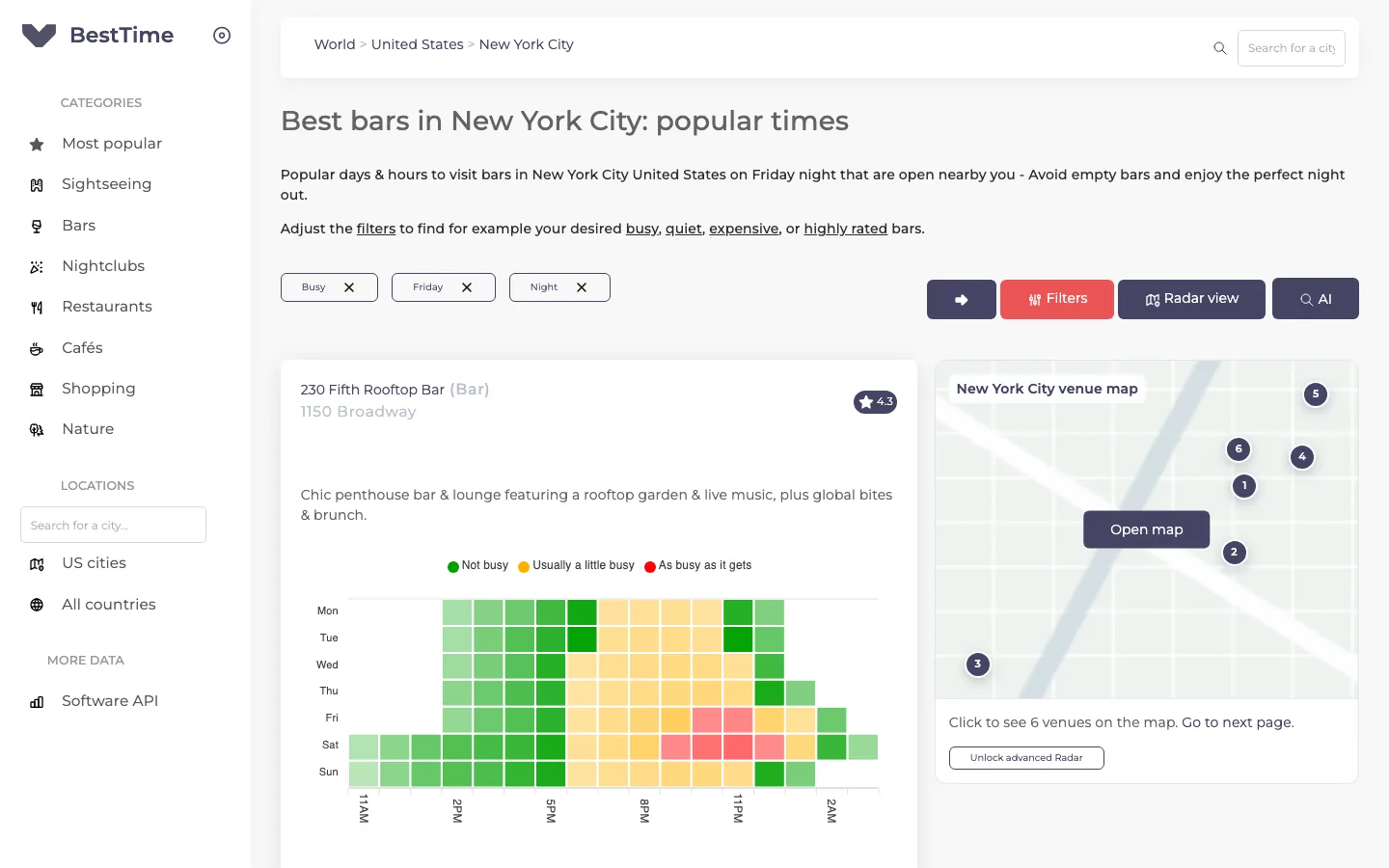 The free city guides use the same filters: day, time of day and busyness.
Step 1: Make your first filter call
Find bars within 2 km of the Mission District in San Francisco that are at least 70% busy at some point between 9 PM and 11 PM on Friday:
import os
import requests

BASE = "https://besttime.app/api/v1"
KEY = os.environ["BESTTIME_PRIVATE_KEY"]

params = {
    "api_key_private": KEY,
    "lat": 37.760,
    "lng": -122.421,
    "radius": 2000,
    "types": "BAR",
    "day_int": 4,      # Friday
    "hour_min": 21,    # 9 PM
    "hour_max": 23,    # 11 PM
    "busy_min": 70,
}

data = requests.get(f"{BASE}/venues/filter", params=params, timeout=60).json()
print(data["venues_n"], "venues")
for v in data["venues"]:
    print(v["venue_name"], v["day_raw"])
The same with cURL:
curl --request GET "https://besttime.app/api/v1/venues/filter?api_key_private=$BESTTIME_PRIVATE_KEY&lat=37.760&lng=-122.421&radius=2000&types=BAR&day_int=4&hour_min=21&hour_max=23&busy_min=70"
Step 2: Read the response
This response from the documentation is trimmed to one venue. It came from a filter on London restaurants, Friday 6 PM to 11 PM, with foot_traffic=both:
{
  "status": "OK",
  "venues_n": 2,
  "venues": [
    {
      "venue_id": "ven_6f5a30484241302d48623552676b6446556e49492d36374a496843",
      "venue_name": "50 Kalò di Ciro Salvo Pizzeria London",
      "venue_address": "7 Northumberland Ave London WC2N 5BY United Kingdom",
      "venue_type": "RESTAURANT",
      "venue_lat": 51.5071129,
      "venue_lng": -0.1265196,
      "rating": 4.5,
      "reviews": 1782,
      "price_level": 2,
      "venue_dwell_time_min": 60,
      "venue_dwell_time_max": 120,
      "day_int": 4,
      "day_info": {
        "day_text": "Friday",
        "day_max": 87,
        "day_mean": 41,
        "day_rank_max": 2,
        "day_rank_mean": 3
      },
      "day_raw": [55, 80, 85, 80, 55, 30],
      "day_raw_whole": [0, 0, 0, 0, 0, 0, 15, 20, 15, 10, 15, 30,
                        55, 80, 85, 80, 55, 30, 15, 0, 0, 0, 0, 0]
    }
  ],
  "window": {
    "day_window": "Friday 6PM until Friday 11PM",
    "time_window_start": 18,
    "time_window_end": 23,
    "time_window_start_ix": 12,
    "time_window_end_ix": 17,
    "time_local": 8,
    "time_local_index": 2
  }
}
The fields you use most:
| Field | Meaning |
|---|---|
day_raw |
Forecast values for the selected hours only. Here 6 PM to 11 PM. |
day_raw_whole |
All 24 hours of the day, when foot_traffic is day or both. |
day_info.day_max |
The highest hour of this day, relative to the weekly peak. |
day_info.day_rank_max |
This day's rank in the week by peak, 1 (busiest) to 7. |
day_info.day_rank_mean |
This day's rank by total volume. |
venue_dwell_time_min, venue_dwell_time_max |
Usual visit length in minutes, 0 when unknown. |
rating, reviews, price_level |
0 when unknown. |
window |
Which day and hours the values cover, and the index of the current local hour (time_local_index). |
venues_n |
Number of venues returned. |
day_info also includes opening hours in venue_open_close_v2, with one or more opening periods per day.
Step 3: Choose the area
Every call needs an area or a collection. Use one of these:
- Circle:
lat,lngandradiusin meters. - Bounding box:
lat_min,lng_min(south-west) andlat_max,lng_max(north-east). This fits a map view. - Collection:
collection_idorcollection_ids(see step 9). You can combine a collection with an area.
Coordinates allow at most 3 decimals, about 111 meters. You cannot mix the circle and the bounding box in one call.
Step 4: Filter on busyness, day and hours
| Parameter | What it does |
|---|---|
busy_min |
Minimum busyness, 0 to 100. |
busy_max |
Maximum busyness, 0 to 100. |
busy_conf |
any (default): at least one selected hour must match. all: every selected hour must match. |
day_int |
Day of the week, 0 (Monday) to 6 (Sunday). |
hour_min, hour_max |
The hours to look at, in 24-hour notation within the 6 AM to 5 AM day window. |
now |
true sets the day and hour to the current local time. One timezone per call, so use it inside one city. |
day_rank_min, day_rank_max |
Keep venues by how this day ranks in their week, 1 (busiest day) to 7. |
Some examples:
- Busy all evening:
busy_min=60,busy_conf=all,hour_min=19,hour_max=22. - Quiet for the whole morning:
busy_max=30,busy_conf=all,hour_min=8,hour_max=11. - Late night:
hour_min=22,hour_max=2covers 10 PM to 2 AM. The window wraps past midnight because the day runs to 5 AM. - Their big night:
day_int=5withday_rank_max=1keeps venues for which Saturday is the busiest day of the week.
now cannot be combined with day_int, hour_min or hour_max. Use now for the forecast of the current hour, or set the day and hours yourself.
Step 5: Filter on type, rating, reviews and price
| Parameter | What it does |
|---|---|
types |
One or more venue types, comma separated, such as BAR,CLUBS. Common types: BAR, CLUBS, RESTAURANT, CAFE, COFFEE, SUPERMARKET, MUSEUM, PARK, FITNESS, SHOPPING_CENTER, TOURIST_DESTINATION. The docs list all of them. |
rating_min, rating_max |
Rating from 2.0 to 5.0 in steps of 0.5. rating_min drops venues without a rating. |
reviews_min, reviews_max |
Number of reviews. |
price_min, price_max |
Price level 1 (cheapest) to 5. price_min drops venues without a price level. price_max keeps them. |
Example: highly rated, affordable restaurants that are quiet at lunch on Tuesday.
params = {
    "api_key_private": KEY,
    "lat": 52.370, "lng": 4.895, "radius": 1500,   # central Amsterdam
    "types": "RESTAURANT",
    "rating_min": 4.5,
    "reviews_min": 200,
    "price_max": 2,
    "day_int": 1,                  # Tuesday
    "hour_min": 12, "hour_max": 13,
    "busy_max": 40, "busy_conf": "all",
}
Step 6: Sort and page the results
By default venues are sorted by number of reviews, highest first.
order_by: one or two comma-separated keys. Options:reviews,rating,price_level,name,day_rank_max,day_rank_mean,day_max,day_mean,dwell_time_min,dwell_time_max,date,now, or an hour from0to23.order:desc(default) orasc, one perorder_bykey, such asorder=desc,desc.limit: maximum venues returned. Default 5000, maximum 10000.page: page number, starting at 0.
Sorting by an hour ranks venues by their forecast at that hour. order_by=22,reviews puts the venues busiest at 10 PM on top and breaks ties by reviews. order_by=dwell_time_max puts places where people stay longest on top.
One known limitation: busy_min and busy_max are applied after limit. If you combine a busyness filter with a small limit, you can get fewer results than expected. Leave limit out when you filter on busyness, and page or trim on your side.
Step 7: Choose how much forecast data to return
foot_traffic controls the hourly arrays:
limited(default):day_rawfor the selected hours only.day:day_raw_wholewith all 24 hours, and noday_raw.both: both arrays.
Use both when you want to show a full-day chart but filter on a few hours.
Step 8: Put it together
A nightlife query in one call: bars and clubs within 3 km of Shoreditch in London, at least 70% busy in every hour from 10 PM to midnight on Saturday, rated 4.0 or higher, sorted by the forecast at 11 PM, first 20 results, with the full day for a chart.
params = {
    "api_key_private": KEY,
    "lat": 51.526, "lng": -0.078, "radius": 3000,
    "types": "BAR,CLUBS",
    "day_int": 5,
    "hour_min": 22, "hour_max": 0,
    "busy_min": 70, "busy_conf": "all",
    "rating_min": 4.0,
    "order_by": "23,reviews", "order": "desc,desc",
    "foot_traffic": "both",
}
data = requests.get(f"{BASE}/venues/filter", params=params, timeout=60).json()
top = data["venues"][:20]   # trim on your side because busy_min is applied after limit
Step 9: Group venues with collections
Venue types cover common categories. Your app may need its own groups: bars with live music, venues with karaoke, your client's favorite spots, or the venues in a sales territory. Collections handle this. A collection is a named list of venue IDs, and you can pass it to Venue Filter.
Ways to fill a collection:
- Add venues one by one with the collection endpoints below.
- Pass
collection_idto a New Forecast call to add that venue when it succeeds. - Every Venue Search creates a collection with its results. Pass an existing
collection_idto a search to merge new results into it.
A venue can be in many collections at once.
Create a collection
r = requests.post(
    f"{BASE}/collection",
    params={"api_key_private": KEY, "name": "Live music"},
    timeout=30,
)
live_music = r.json()["collection"]["collection_id"]
{
  "collection": {
    "collection_id": "col_51387131543761435650505241346a39",
    "name": "Live music"
  },
  "status": "OK"
}
A collection_id is 36 characters long. You can also pass your own collection_id when you create one.
Add venues to it
venue_ids = [
    "ven_415149775a732d724c774b52596f545a717a51754e66624a496843",
    "ven_4d43346d6c56553869504952673477436371333146617a4a496843",
]
for venue_id in venue_ids:
    requests.post(
        f"{BASE}/collection/{live_music}/{venue_id}",
        params={"api_key_private": KEY},
        timeout=30,
    )
Each call returns "message": "Venue added to collection".
Manage collections
| Action | Request |
|---|---|
| List the venue IDs in a collection | GET /api/v1/collection/{collection_id} |
| Find the collections that contain a venue | GET /api/v1/collection/by_venue/{venue_id} |
| Remove a venue from a collection | DELETE /api/v1/collection/{collection_id}/{venue_id} |
| Delete a collection | DELETE /api/v1/collection?collection_id=... |
Deleting a collection does not delete the venues or their forecasts. Your collections are also listed on the Collections page in your account.
Step 10: Filter by collection
Pass one collection with collection_id, or several with collection_ids as a comma-separated list. You cannot send both parameters in one call.
Example: you created a "Live music" collection and a "Karaoke" collection. Find the venues in either one that are at least 60% busy on Thursday evening:
params = {
    "api_key_private": KEY,
    "collection_ids": f"{live_music},{karaoke}",
    "day_int": 3,                     # Thursday
    "hour_min": 18, "hour_max": 3,    # 6 PM to 3 AM
    "busy_min": 60,
    "order_by": "reviews", "order": "desc",
}
data = requests.get(f"{BASE}/venues/filter", params=params, timeout=60).json()
The result contains venues tagged as live music OR karaoke that also match the busyness filter. A venue in both collections appears once.
The same pattern powers category menus in an app. Say you keep three collections: "All venues" with five venues, "Cocktail bars" with two and "Sports bars" with two. Then:
collection_id=<all venues>returns all five.collection_ids=<cocktail bars>returns the two cocktail bars.collection_ids=<cocktail bars>,<sports bars>returns four, without the steakhouse that is only in "All venues".collection_ids=<all venues>,<sports bars>returns five, with no duplicates.
Add a day, hours and busy_min to any of these to turn a static list into "cocktail bars that are busy tonight".
Credits and limits
| Item | Value |
|---|---|
| Credits per call | 1 per 10 venues returned, minimum 1 |
| Rate limit | 30 requests per minute |
Maximum limit |
10000 venues |
A filter that returns 20 venues costs 2 credits. On Basic Usage ($29 per month including 1,200 credits, then $0.04 per credit) that is $0.08 after the included credits. Pro Venues covers a fixed venue list for a flat fee, from $96 per month for 50 venues. See pricing.
To save credits: filter on a small area, cache results for a few minutes per area and hour, and use limit and page when you do not filter on busyness.
Troubleshooting
- No venues returned. Remove filters one at a time to see which one empties the result. Check that the area is right and that
rating_minorprice_minare not dropping venues without that data. - Fewer venues than
limit.busy_minandbusy_maxrun afterlimit. Leavelimitout. - Old account sees few venues. Set
own_venues_only=falseto search the whole database. - Wrong hour. Remember index 0 is 6 AM and that
nowuses one timezone per call. - Values look out of date. Venue Filter uses stored forecasts, never older than a month. For fresh values on key venues, refresh them with the New Forecast endpoint every 2 to 4 weeks.
Next steps
- See filter recipes by use case in the guide to filtering public businesses by foot traffic.
- Build a whole app on top of Venue Filter in vibe coding a busy-bars app.
- Check every parameter in the API documentation.
Questions
What does the Venue Filter API do?
It returns all venues in an area or collection that match your filters on predicted busyness, day, hours, venue type, rating, reviews and price level, with their hourly forecast for the selected day.
Do I need to forecast venues before I can filter them?
Not for accounts created after July 25, 2024. Venue Filter searches all venues in the BestTime database by default. Set own_venues_only to limit it to venues you added yourself.
How much does a Venue Filter call cost?
1 credit per 10 venues returned, with a minimum of 1 credit per call.
Can I filter on my own venue groups?
Yes. Put venues in collections, then pass collection_id for one collection or collection_ids for several. Venues in more than one collection are returned once.
BestTime in 47 seconds
See how busy any place gets, hour by hour
BestTime forecasts how busy a venue gets for every hour of the week, from anonymized, aggregated phone location data combined with weather, events and holidays. Look up one venue, compare a whole city, or use the API.
Try BestTime for free
Create a free account without a credit card, forecast a few venues you know, and see their busy and quiet hours for every day of the week.
Start free See pricing