 BestTime
When developers search for a popular times API, they want one thing: the usual busyness of a place for every hour of the week, as data they can put in their own app. BestTime provides exactly that. Send a venue name and address, and you get an hourly busyness forecast from 0 to 100 for all seven days, plus peak hours, quiet hours and typical visit length.
You can browse forecasts for real venues in the free city guides without an account, or read on for how the API works, what it costs and when it fits.
What developers mean by "popular times"
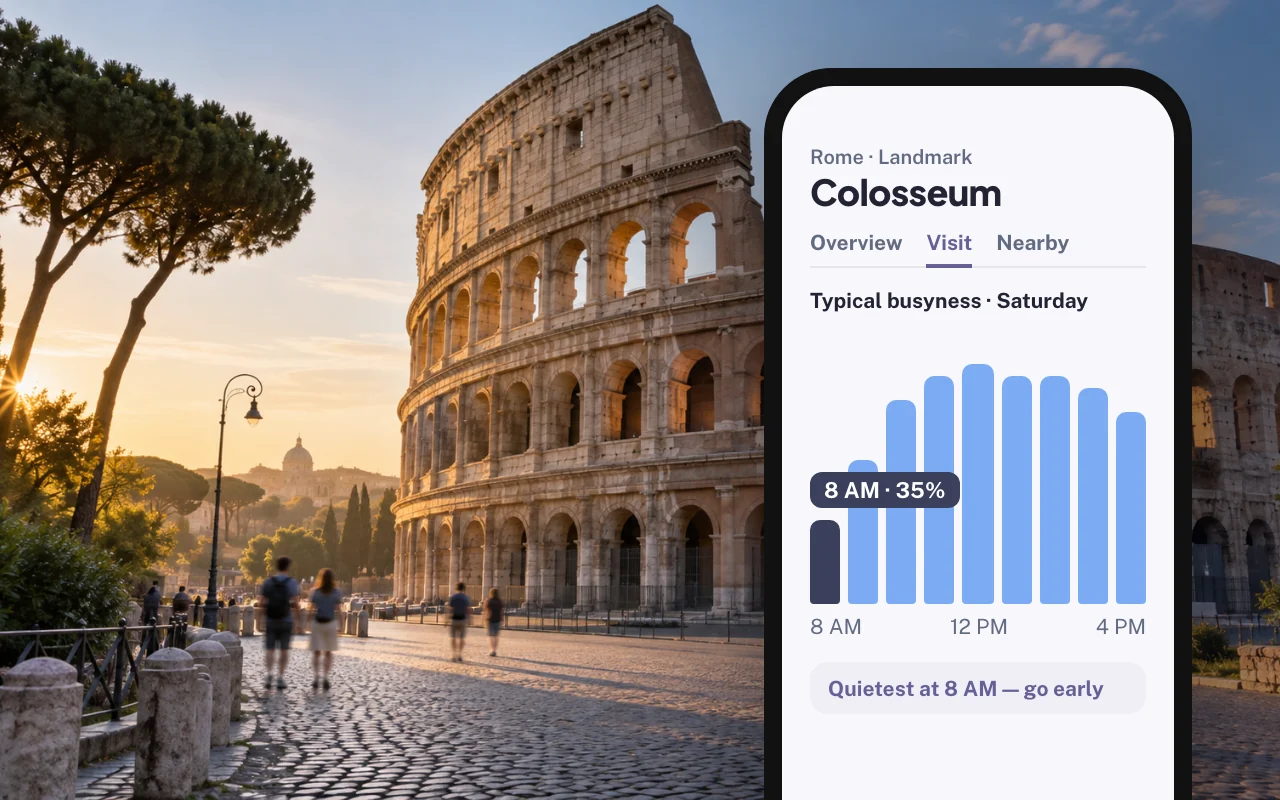
"Popular times" has become the everyday name for a simple chart: one bar per hour, showing when a restaurant, shop, gym or attraction is usually busy. As data, that chart is a list of 24 numbers per day, for 7 days.
A useful popular times API gives you:
- Hourly values for every day of the week, so you can show any day, not only today.
- A consistent scale, so you can label hours as quiet or busy.
- Peaks and quiet periods already worked out, so you do not have to compute them.
- Opening hours and timezone, so you show the right hours in the right local time.
- Coverage across many places and countries, so the feature works where your users are.
Why you want it in your own app
Showing a busyness chart inside your product keeps users in your product. Common uses:
- Travel and city guides: "Go before 10 AM, it gets busy after lunch."
- Nightlife apps: rank bars by how lively they usually are at 11 PM on Saturday.
- Maps and store locators: show the quietest nearby branch right now and later today.
- Gyms, pools and attractions: help members avoid the rush.
- Operations dashboards: line up staff, deliveries and cleaning with forecast peaks.
- Research: compare demand by hour across categories and cities.
All of these need data you can store, combine and style your own way. A screenshot of a chart elsewhere is not enough.
How BestTime provides hourly busy times
BestTime forecasts busyness for public venues in 150+ countries. The forecasts are built from anonymized, aggregated phone location data combined with other real-world signals such as weather, events and holidays. Read how venue busyness forecasts work for the method.
For each venue you get:
| Data | Details |
|---|---|
| Hourly busyness | 0 to 100 for every hour of all 7 days. 100 is the venue's busiest hour of the week. |
| Peak hours | Start, maximum and end of each daily peak, with an intensity from 1 to 5 |
| Busy and quiet hours | Lists per day |
| Surge hours | When most people arrive and when most leave |
| Day ranking | Days ranked by peak and by total volume |
| Dwell time | Usual minimum, maximum and average visit length in minutes |
| Venue details | Name, address, coordinates, timezone, type, opening hours, rating, reviews and price level |
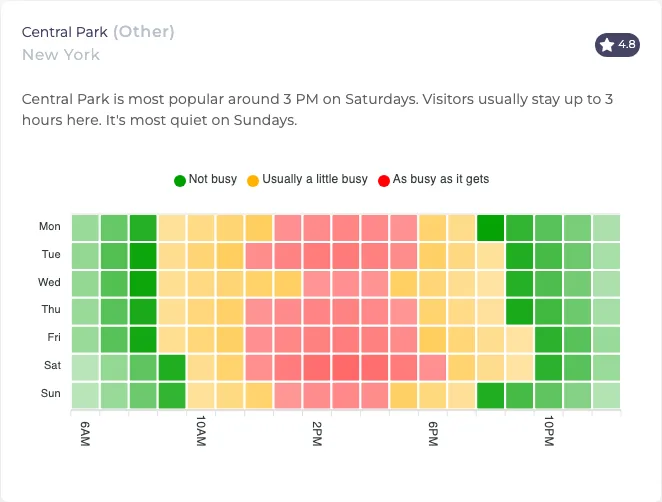 Hourly busyness for Central Park in New York: busiest around 3 PM on Saturday, quietest on Sundays. Visitors usually stay up to 3 hours.
Two rules for honest product copy:
- The values are relative. 80 means "80% of this venue's own peak". It is not 80 people and not 80% of capacity. BestTime does not return visitor counts.
- They describe a typical week. Label them "usually busy" or "typically quiet". Refresh forecasts every 2 to 4 weeks to follow seasonal change.
API example: hourly busy times for one venue
Create a free test account, no credit card needed, and copy your API keys. Call the API from your server so the private key never reaches a browser or app bundle.
Create the forecast
import os
import requests

r = requests.post(
    "https://besttime.app/api/v1/forecasts",
    params={
        "api_key_private": os.environ["BESTTIME_PRIVATE_KEY"],
        "venue_name": "Empire State Building",
        "venue_address": "20 W 34th St, New York, NY 10001, United States",
    },
    timeout=60,
)
forecast = r.json()

venue_id = forecast["venue_info"]["venue_id"]
for day in forecast["analysis"]:
    print(day["day_info"]["day_text"], day["day_raw"])
The response, trimmed to one day:
{
  "status": "OK",
  "venue_info": {
    "venue_id": "ven_454e4e686e4a7046453659526b6f775a6c3673525158614a496843",
    "venue_name": "Empire State Building",
    "venue_address": "20 W 34th St. New York, NY 10001 United States",
    "venue_timezone": "America/New_York",
    "venue_dwell_time_avg": 82
  },
  "analysis": [
    {
      "day_info": { "day_int": 0, "day_text": "Monday", "day_max": 82, "day_rank_max": 6 },
      "quiet_hours": [20, 21],
      "surge_hours": { "most_people_come": 9, "most_people_leave": 22 },
      "day_raw": [10, 25, 40, 55, 65, 75, 75, 75, 75, 75, 70, 65,
                  50, 40, 30, 25, 25, 25, 20, 15, 10, 0, 5, 5]
    }
  ]
}
day_raw has 24 values and starts at 6 AM, not midnight. A BestTime day runs from 6 AM to 5 AM the next morning, so late-night hours stay with the evening they belong to. Check the returned name and address before you store the venue_id.
Read it again by venue ID
Store the venue_id and read the forecast from then on. Query endpoints take your public key:
curl --request GET "https://besttime.app/api/v1/forecasts/day/raw?api_key_public=$BESTTIME_PUBLIC_KEY&venue_id=ven_454e4e686e4a7046453659526b6f775a6c3673525158614a496843&day_int=5"
That returns the 24 values for Saturday. Other query endpoints return a single hour (/forecasts/hour/raw), today's peaks (/forecasts/peaks) or quiet periods (/forecasts/quiet). The beginner's guide to the foot traffic data API shows each one.
Busy times for a whole area
If you need busy times for many places at once, do not loop over single venues. Venue Filter returns every venue in an area that matches a day, hours, category and busyness range, with the hourly values included. For example: bars within 2 km that are usually at 70% or more of their peak on Friday from 9 PM to 11 PM. See the Venue Filter API tutorial.
Pricing
| Item | Cost |
|---|---|
| Free test account | No credit card |
| First forecast of a venue by name and address | 2 credits |
| Refresh, or a query by venue ID | 1 credit |
| Basic Usage | $29 per month including 1,200 credits, then $0.04 per credit |
| Pro Venues | Unlimited forecasts for a fixed venue list: $96 per month for 50 venues, $119 for 100, $149 for 500, $249 for 1,000 |
A worked example: a city guide with 200 venues forecasts each one once (400 credits), then refreshes twice a month and serves cached charts (400 credits per month). That fits inside Basic Usage at $29 per month. See the pricing page.
When to use it, and when not
Use BestTime when your product needs:
- the usual busy and quiet hours of a public venue, for any day of the week,
- "best time to visit" advice, ranking or filtering by busyness,
- the same data for many venues across many cities,
- an API you can start with today, free, with published prices.
Pick something else when you need:
- Visitor counts or trade-area analytics. Platforms such as Placer.ai or Advan Research focus on visit volumes for retail and real estate analysis. The foot traffic data guide compares providers.
- Exact occupancy. Use door counters, ticket scans or reservations.
- Place identity only. If you only need addresses, opening hours or photos, a place directory is enough.
Before you commit, test a sample of 10 to 50 venues from your launch cities, including smaller places. Check how many return a forecast and whether the hourly shape matches what you know about those places.
Next steps
- Browse hourly forecasts for real venues in the free city guides.
- Follow the beginner's guide to the foot traffic data API.
- Compare data providers in the foot traffic data guide.
Questions
What is a popular times API?
It is an API that returns how busy a place usually is at each hour of the day, for every day of the week. Developers use it to show busy hours, quiet hours and the best time to visit inside their own app.
Where does BestTime's hourly busyness data come from?
BestTime builds its forecasts from anonymized, aggregated phone location data combined with other real-world signals such as weather, events and holidays.
Does BestTime return the number of visitors?
No. Each hour gets a value from 0 to 100 relative to the venue's own busiest hour of the week. It shows when a place is busy, not how many people are there.
Can I try it before I sign up?
Yes. The free preview shows hourly forecasts for sample venues without an account, and a free test account lets you forecast your own venues without a credit card.
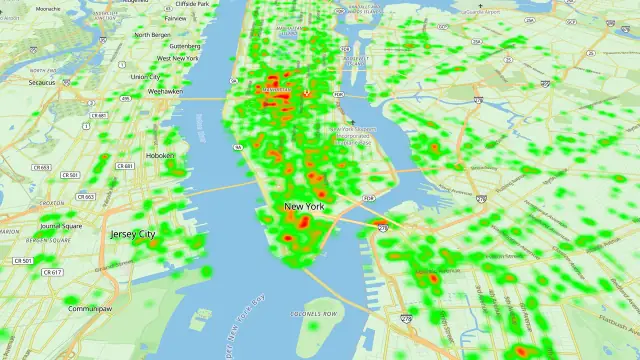
BestTime in 47 seconds
See how busy any place gets, hour by hour
BestTime forecasts how busy a venue gets for every hour of the week, from anonymized, aggregated phone location data combined with weather, events and holidays. Look up one venue, compare a whole city, or use the API.
Try BestTime for free
Create a free account without a credit card, forecast a few venues you know, and see their busy and quiet hours for every day of the week.
Start free See pricing