 BestTime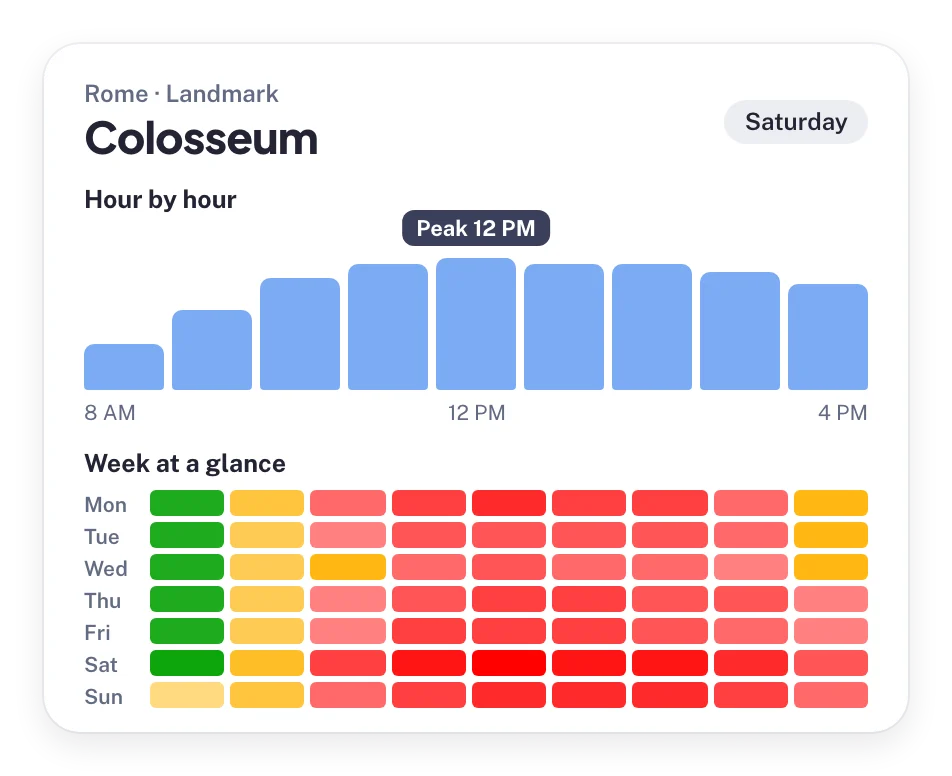
A foot traffic data API tells your code how busy a public place usually is at each hour of the week. With BestTime you send a venue name and address, and you get back a forecast with a 0-100 busyness value for every hour, plus peak hours, quiet hours and dwell time. This guide takes you from your first API key to searching and filtering whole neighborhoods of venues.
You need basic knowledge of HTTP requests. The examples use Python and cURL. If you prefer to click instead of code, start with the introduction to BestTime's forecasting tools.
What a foot traffic data API returns
BestTime forecasts how busy public venues are: restaurants, bars, shops, supermarkets, gyms, museums, parks and attractions in 150+ countries. Forecasts are built from anonymized, aggregated phone location data combined with other real-world signals such as weather, events and holidays.
Each forecast describes a typical week for one venue:
| Data | What it means |
|---|---|
| Hourly busyness (0-100) | 24 values per day for all 7 days. 100 is the venue's busiest hour of the week. |
| Peak hours | When each daily peak starts, reaches its maximum and ends, with an intensity from 1 to 5. |
| Busy and quiet hours | Lists of the busy and quiet hours for each day. |
| Surge hours | The hour when most people arrive and the hour when most people leave. |
| Day ranking | Days ranked 1 to 7 by peak (day_rank_max) and by total volume (day_rank_mean). |
| Hour intensity | A 5-step label per hour: Low, Below average, Average, Above average, High. |
| Venue details | Name, address, coordinates, timezone, type, opening hours, rating, reviews, price level and dwell time in minutes. |
Two rules keep your product honest:
- The scale is relative. A value of 80 means "80% of this venue's own weekly peak". It is not 80 people and not 80% of capacity. BestTime does not return visitor counts.
- A day runs from 6 AM to 5 AM. BestTime keeps Friday night together with Friday, so index
0of a day array is 6 AM and index23is 5 AM the next morning. Bars and clubs would otherwise be split across two days.
If you want the background on how the forecasts are made, read how venue busyness forecasts work.
Step 1: Create an account and get your API keys
Create a free test account. No credit card is needed. Open the API key management page from your account settings. Keys come in pairs:
- Private key (
pri_...): creates forecasts, runs Venue Search and Venue Filter, and lists your venues. Keep it on your server. - Public key (
pub_...): read-only. It queries forecasts that already exist.
You can create more than one key set. A public key can only query forecasts made with its own key set. All key sets draw credits from the same account.
Check that your key works:
curl --request GET "https://besttime.app/api/v1/keys/YOUR_PRIVATE_KEY"
A valid key returns:
{
  "active": true,
  "api_key_private": "pri_a00de9e302662c0217a9cf08ab304122",
  "api_key_public": "pub_e11661721b084d36b8f469a2c012e754",
  "status": "OK",
  "valid": true
}
In the rest of this guide the keys are read from environment variables:
export BESTTIME_PRIVATE_KEY="pri_..."
export BESTTIME_PUBLIC_KEY="pub_..."
Step 2: Create your first forecast
The New Forecast endpoint takes a venue name and address and returns the full weekly forecast.
- Endpoint:
POST https://besttime.app/api/v1/forecasts - Required:
api_key_private,venue_name,venue_address - Optional:
collection_idto add the venue to a group of venues - Cost: 2 credits for the first forecast of a venue. A refresh costs 1 credit.
import os
import requests

response = requests.post(
    "https://besttime.app/api/v1/forecasts",
    params={
        "api_key_private": os.environ["BESTTIME_PRIVATE_KEY"],
        "venue_name": "Empire State Building",
        "venue_address": "20 W 34th St, New York, NY 10001, United States",
    },
    timeout=60,
)
data = response.json()

if data.get("status") == "OK":
    info = data["venue_info"]
    print(info["venue_id"], info["venue_name"], info["venue_address"])
    monday = data["analysis"][0]
    print(monday["day_info"]["day_text"], monday["day_raw"])
else:
    print(response.status_code, data.get("message"))
The same request with cURL:
curl --request POST "https://besttime.app/api/v1/forecasts?api_key_private=$BESTTIME_PRIVATE_KEY&venue_name=Empire%20State%20Building&venue_address=20%20W%2034th%20St%2C%20New%20York%2C%20NY"
The response is long because it covers all seven days. Here it is trimmed to the parts you use most:
{
  "status": "OK",
  "epoch_analysis": "1583314752",
  "venue_info": {
    "venue_id": "ven_454e4e686e4a7046453659526b6f775a6c3673525158614a496843",
    "venue_name": "Empire State Building",
    "venue_address": "20 W 34th St. New York, NY 10001 United States",
    "venue_timezone": "America/New_York",
    "venue_type": "HISTORICAL",
    "venue_dwell_time_min": 45,
    "venue_dwell_time_max": 120,
    "venue_dwell_time_avg": 82,
    "venue_lat": 40.7484405,
    "rating": 4.7,
    "reviews": 121628
  },
  "analysis": [
    {
      "day_info": {
        "day_int": 0,
        "day_text": "Monday",
        "day_rank_max": 6,
        "day_rank_mean": 6,
        "day_max": 82,
        "day_mean": 79,
        "venue_open_close_v2": { "12h": ["11am-9pm"], "open_24h": false }
      },
      "busy_hours": [],
      "quiet_hours": [20, 21],
      "peak_hours": [],
      "surge_hours": { "most_people_come": 9, "most_people_leave": 22 },
      "hour_analysis": [
        { "hour": 6, "intensity_nr": -1, "intensity_txt": "Below average" }
      ],
      "day_raw": [10, 25, 40, 55, 65, 75, 75, 75, 75, 75, 70, 65,
                  50, 40, 30, 25, 25, 25, 20, 15, 10, 0, 5, 5]
    }
  ]
}
What to read first:
venue_info.venue_idis the key to everything else. Store it.analysisis a list of 7 days, Monday (day_int0) to Sunday (6).day_rawholds 24 hourly values, starting at 6 AM.peak_hoursholds objects withpeak_start,peak_max,peak_endandpeak_intensity.venue_open_close_v2replaces the oldervenue_openandvenue_closedfields and supports more than one opening period per day.
When the forecast fails
Check the returned name and address before you save a venue_id. The geocoder can match a different place with a similar name. A 404 response comes with a message:
- "Could not find venue" means the lookup failed. Try a clearer address: keep the street, city and country, and drop the postal code or house number if needed.
- "Venue found, but could not forecast this venue" means BestTime found the place but does not have enough data for it. A different address will not help. A venue usually needs at least 100 visitors per week.
A failed forecast costs 1 credit, so validate your inputs before you send a large batch.
Forecast a list of venues
If you already have names and addresses, loop over them on your server and store the IDs:
venues = [
    ("Alchemist Bar & Lounge", "679 3rd St, San Francisco, CA"),
    ("Zeitgeist", "199 Valencia St, San Francisco, CA"),
]

ids = {}
for name, address in venues:
    r = requests.post(
        "https://besttime.app/api/v1/forecasts",
        params={
            "api_key_private": os.environ["BESTTIME_PRIVATE_KEY"],
            "venue_name": name,
            "venue_address": address,
        },
        timeout=60,
    ).json()
    if r.get("status") == "OK":
        ids[name] = r["venue_info"]["venue_id"]
The default rate limit is 300 requests per minute. For a whole category in an area, Venue Search (below) is faster than a loop.
Step 3: Query a forecast by venue ID
You do not need a new forecast every time a user opens a page. A forecast describes a typical week, so you create it once and read it many times. Query endpoints read the stored forecast:
- Method:
GET - Required:
venue_idandapi_key_public - Cost: 1 credit per query
| Endpoint | Returns |
|---|---|
/api/v1/forecasts/week |
The full forecast, same shape as the New Forecast response |
/api/v1/forecasts/week/raw |
168 hourly values for the week |
/api/v1/forecasts/day |
All analysis for one day (day_int) |
/api/v1/forecasts/day/raw |
24 hourly values for one day |
/api/v1/forecasts/hour |
The intensity label for one day_int and hour |
/api/v1/forecasts/hour/raw |
The 0-100 value and label for one hour |
/api/v1/forecasts/peaks |
Today's peaks with time until each one starts |
/api/v1/forecasts/busy |
Today's busy hours |
/api/v1/forecasts/quiet |
Today's quiet periods with time until each one starts |
/api/v1/forecasts/surge |
When most people arrive and leave |
The /forecasts/week query is free within one day after you created the forecast. That helps when you forecast a venue and then want the full analysis again.
Get one day
r = requests.get(
    "https://besttime.app/api/v1/forecasts/day/raw",
    params={
        "api_key_public": os.environ["BESTTIME_PUBLIC_KEY"],
        "venue_id": "ven_454e4e686e4a7046453659526b6f775a6c3673525158614a496843",
        "day_int": 4,  # Friday
    },
    timeout=30,
)
print(r.json()["analysis"]["day_raw"])  # 24 values, 6 AM to 5 AM
Leave out day_int and you get the current day in the venue's local time.
Get one hour
curl --request GET "https://besttime.app/api/v1/forecasts/hour/raw?api_key_public=$BESTTIME_PUBLIC_KEY&venue_id=ven_454e...&day_int=3&hour=16"
{
  "analysis": {
    "hour_analysis": { "hour": 16, "intensity_nr": 0, "intensity_txt": "Average" },
    "hour_raw": 70
  },
  "status": "OK"
}
hour uses 24-hour notation from 0 to 23. Remember the day window: day_int=4 with hour=1 means 1 AM on Saturday morning, as part of Friday night.
Get peaks and quiet hours
The peaks and quiet endpoints add timing on top of the stored forecast. They tell you how long until a peak starts or a quiet period begins, in the venue's timezone.
r = requests.get(
    "https://besttime.app/api/v1/forecasts/peaks",
    params={
        "api_key_public": os.environ["BESTTIME_PUBLIC_KEY"],
        "venue_id": "ven_454e4e686e4a7046453659526b6f775a6c3673525158614a496843",
        "day_step": 1,  # tomorrow
    },
    timeout=30,
)
for peak in r.json()["analysis"]["peak_hours"]:
    print(peak["peak_start_12h"], peak["peak_max_12h"], peak["peak_end_12h"], peak["peak_intensity"])
A trimmed peak object:
{
  "peak_start": 18, "peak_start_12h": "6PM", "peak_start_in": "2 hour and 40 minutes",
  "peak_max": 21, "peak_max_12h": "9PM",
  "peak_end": 23, "peak_end_12h": "11PM",
  "peak_intensity": 3,
  "peak_delta_mean_week": 12
}
The quiet endpoint works the same way and returns quiet_hours periods plus a flat quiet_hours_list. Use day_int for a fixed weekday, or day_step and hour_step to move relative to the venue's current local time. You cannot combine day_int with the step parameters.
List your venues
GET /api/v1/venues with your private key lists every venue you have forecast, with its venue_id, name, address and venue_forecasted flag. It supports limit and page.
Refresh a forecast
Forecasts describe recent weeks, so refresh them every 2 to 4 weeks. Call POST /api/v1/forecasts again with the venue_id (or the same name and address). A refresh costs 1 credit. Every query endpoint also accepts POST with the same parameters, which refreshes the forecast and returns the query result in one call.
Step 4: Find many venues with Venue Search
When you do not know venue names in advance, Venue Search finds them for you. You send a text query such as "cocktail bars in Lower Manhattan New York" and BestTime looks up matching venues and forecasts them in the background.
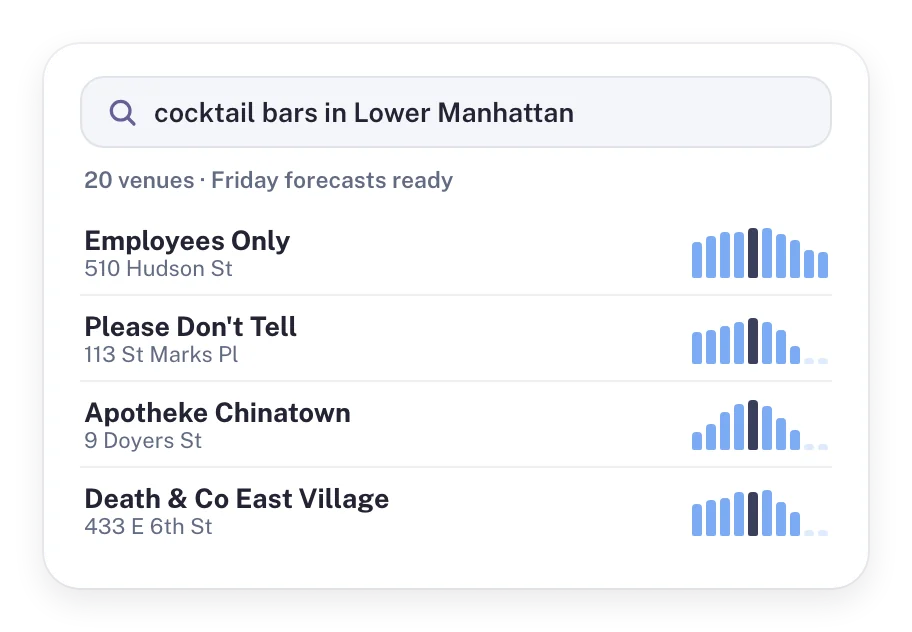 Venue Search returns matching venues with a forecast for each one.
r = requests.post(
    "https://besttime.app/api/v1/venues/search",
    params={
        "api_key_private": os.environ["BESTTIME_PRIVATE_KEY"],
        "q": "cocktail bars in Lower Manhattan New York",
        "num": 20,
        "format": "raw",
    },
    timeout=30,
)
job = r.json()
print(job["job_id"], job["collection_id"])
print(job["_links"]["venue_search_progress"])
The response comes back fast with a job_id, a collection_id and a progress link. You poll the progress link until job_finished is true, then read the venues and their forecasts. Each venue found gets its own forecast at 2 credits, on top of a small search charge per 20 results.
The full flow, with polling, natural language filters and costs, is in the Venue Search API tutorial.
Step 5: Filter venues by busyness with Venue Filter
Venue Filter is the fastest way to work with many venues. It returns venues in an area that match your filters on busyness, day, hour, type, rating, reviews and price level, with their hourly forecast for the selected day.
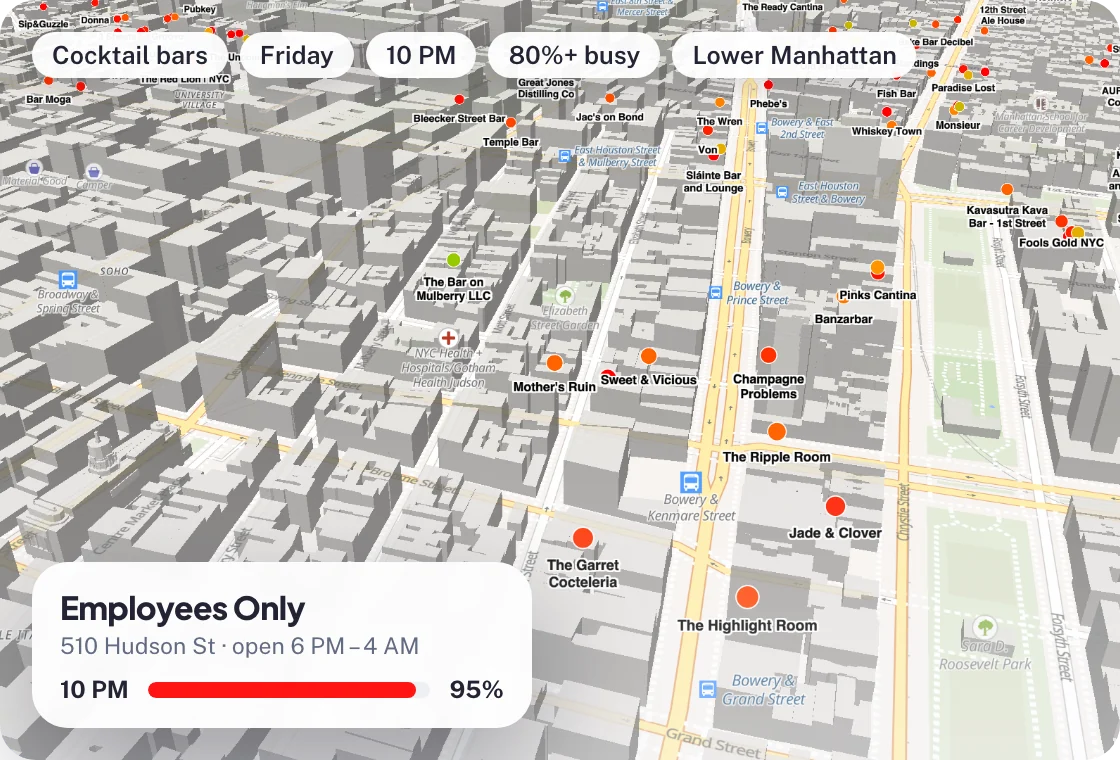 Venue Filter: cocktail bars in Lower Manhattan forecast at 80% or more of their peak on Friday at 10 PM.
This call finds bars within 2 km of a point in San Francisco that are forecast at 70% or more of their weekly peak on Friday between 9 PM and 11 PM:
r = requests.get(
    "https://besttime.app/api/v1/venues/filter",
    params={
        "api_key_private": os.environ["BESTTIME_PRIVATE_KEY"],
        "types": "BAR",
        "day_int": 4,      # Friday
        "hour_min": 21,    # 9 PM
        "hour_max": 23,    # 11 PM
        "busy_min": 70,
        "lat": 37.761,
        "lng": -122.421,
        "radius": 2000,
        "order_by": "day_rank_max,reviews",
        "order": "asc,desc",
    },
    timeout=60,
)
for v in r.json()["venues"]:
    print(v["venue_name"], v["day_raw"])
Each venue in the response includes day_raw for the selected hours, day_info, rating, reviews, price level, type, coordinates and dwell time. For accounts created after July 25, 2024, Venue Filter searches all venues in the BestTime database, not only the venues you forecast yourself.
Venue Filter costs 1 credit per 10 venues returned, with a minimum of 1 credit. Every parameter, sorting, paging and collections are covered in the Venue Filter API tutorial. For ready-made filter recipes, see the guide to filtering public businesses by foot traffic.
Credits and pricing
Every API call uses credits. The website tools use the same API, so they count too.
| Call | Credits |
|---|---|
| First forecast of a venue by name and address | 2 |
| Refresh a forecast | 1 |
| Query by venue ID (week, day, hour, peaks, quiet, and so on) | 1 |
| Venue Filter | 1 per 10 venues returned |
| Venue Search | a search charge per 20 results, plus 2 per venue forecast |
Plans:
- Free test account: no credit card. Good for your first calls and a prototype.
- Basic Usage: $29 per month including 1,200 credits, then $0.04 per credit.
- Pro Venues: flat pricing with unlimited forecasts for a fixed list of venues. $96 per month for 50 venues, $119 for 100, $149 for 500 and $249 for 1,000.
A worked example: an app that tracks 300 venues, refreshes each one twice a month and queries each one 10 times a month uses 300 x 2 + 300 x 10 = 3,600 credits after the first forecasts. On Basic Usage that is $29 plus 2,400 extra credits at $0.04, so $125 per month. Pro Venues for up to 500 venues is a flat $149 per month. See the pricing page for details.
Common mistakes
- Treating 100 as full. 100 is the venue's own busiest hour. Do not compare a cafe's 80 and a stadium's 80 as the same crowd.
- Assuming index 0 is midnight. Index 0 is 6 AM. Use
venue_timezoneand the day window, not your server's clock. - Forecasting on every page view. Forecast once, store the
venue_id, query in between, and refresh every few weeks. - Putting the private key in the browser. Call the API from your server. The public key is read-only, but it still spends credits.
- Saving the wrong venue. Compare the returned name and address with what you asked for.
Next steps
- Follow the Venue Search API tutorial to add venues in bulk.
- Build map-style queries with the Venue Filter API tutorial.
- Compare providers in the foot traffic data guide, or read the full API documentation.
Questions
What does a foot traffic data API return?
BestTime returns a forecast for every hour of the week on a 0-100 scale, where 100 is the venue's own busiest hour. It also returns peak, busy and quiet hours, the hours when most people arrive and leave, dwell time and opening hours.
Does the BestTime API return visitor counts?
No. The 0-100 values are relative to each venue's own weekly peak. They are not head counts and not a share of capacity.
How much does a forecast cost?
The first forecast for a venue by name and address costs 2 credits. A refresh or a query by venue ID costs 1 credit. Basic Usage is $29 per month with 1,200 credits included, then $0.04 per credit.
Can I test the foot traffic API for free?
Yes. You can create a free test account without a credit card and make your first API calls with the included test credits.
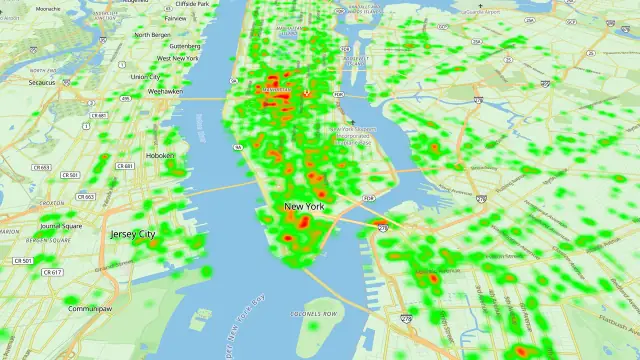
BestTime in 47 seconds
See how busy any place gets, hour by hour
BestTime forecasts how busy a venue gets for every hour of the week, from anonymized, aggregated phone location data combined with weather, events and holidays. Look up one venue, compare a whole city, or use the API.
Try BestTime for free
Create a free account without a credit card, forecast a few venues you know, and see their busy and quiet hours for every day of the week.
Start free See pricing