 BestTime
You can match a venue's music to how busy it usually is by using an hourly busyness forecast as the schedule. Quiet hours get calmer, slower playlists, normal hours get a balanced mix and peak hours get more energy. BestTime gives you a 0-100 forecast for every hour of the week, and your music system turns that into playlist changes.
This guide covers why this works, how to map busyness to playlist modes and the API calls to build it.
Why playlists should follow foot traffic
A shop can feel calm at 11 AM, energetic at 5 PM and overwhelming if the music does not fit the moment. The same goes for restaurants, bars, hotel lounges, malls, gyms and attractions. When the flow of customers changes, the atmosphere should change with it.
Most playlist scheduling uses fixed dayparts: a morning playlist, an afternoon playlist and an evening playlist. That ignores how each venue's week actually looks. A cafe may be packed at 8 AM on weekdays but quiet until 10 AM on Sundays. A bar may be quiet on Monday at 9 PM and full on Friday at the same hour.
Busyness forecasts let you schedule by expected crowd, not only by the clock:
- Retail: match the soundtrack to shopping pace.
- Restaurants and bars: build energy as the evening moves from warm-up to rush.
- Hotels: keep the lobby, lounge and restaurant mood in line with guest flow.
- Malls and attractions: follow crowd patterns through the day.
- Gyms: raise or lower energy with expected attendance.
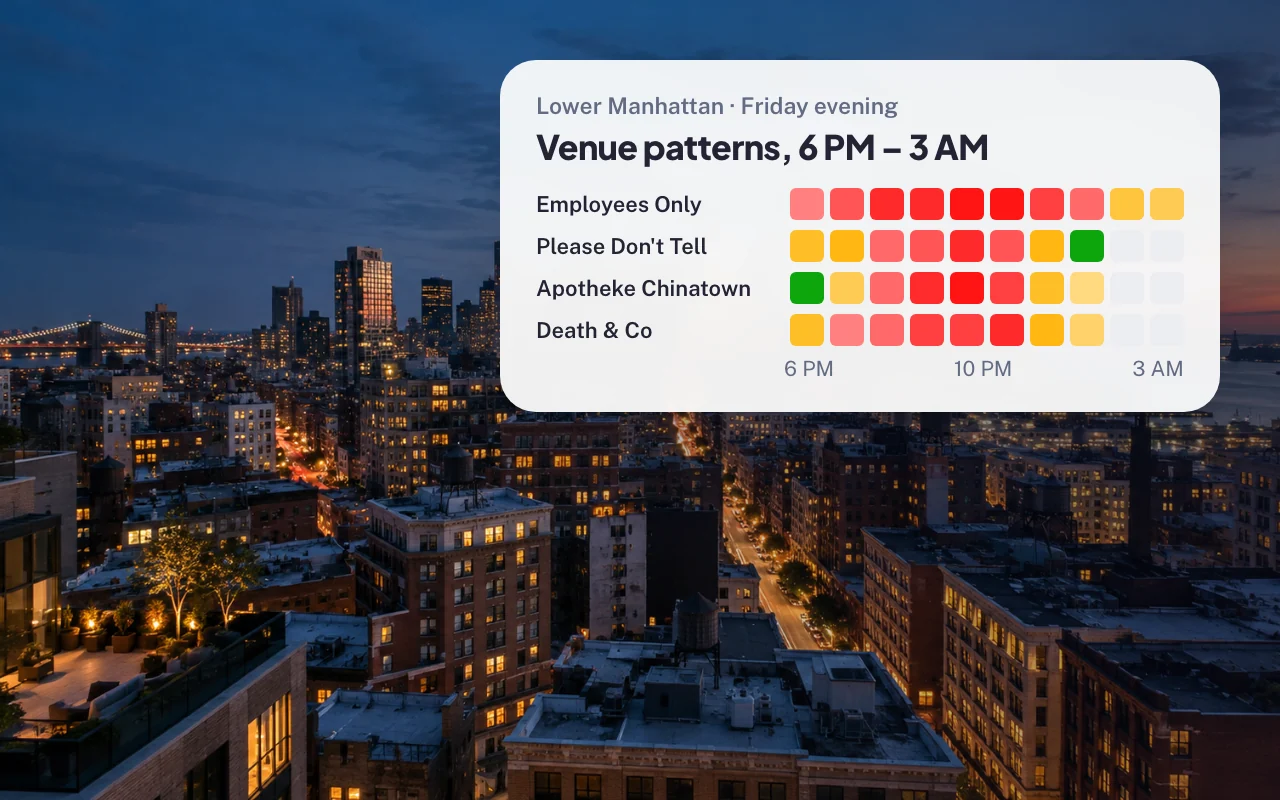
What BestTime provides
BestTime does not pick songs. It provides the demand signal.
For each venue you get:
- Hourly busyness from 0 to 100 for every day of the week.
- Peak, busy and quiet hours for each day.
- Dwell time: how long people usually stay.
The forecasts are built from anonymized, aggregated phone location data combined with other real-world signals such as weather, events and holidays.
The values are relative. 100 means that hour is the venue's busiest of a typical week. 50 means about half of that peak. It is not a head count and not capacity. A playlist engine does not need a head count anyway. It only needs to know whether the venue is usually quiet, normal or busy at a given hour.
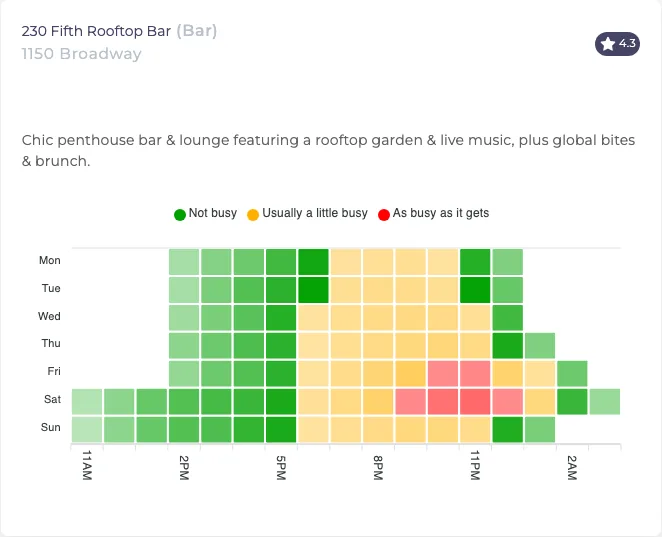 A bar's typical week. The busy hours on Friday and Saturday nights are where a high-energy playlist fits.
Map busyness bands to playlist modes
Start with three bands:
| Forecast busyness | Mode | Music |
|---|---|---|
| 0 to 40 | Quiet | Ambient, lower tempo, more space in the sound |
| 41 to 70 | Normal | Balanced, mid-tempo, on brand |
| 71 to 100 | Busy | More energy, faster pace, stronger rhythm |
Adjust the mapping to the venue. A bookstore, hotel lounge or premium shop may want a restrained sound even at its busiest hours. A sports bar, quick-service restaurant or gym may want the opposite. BestTime gives you the signal. The music policy is yours.
Two refinements help:
- Switch a little early. If 6 PM is the first busy hour, start building energy at 5:30 PM so the room feels ready when people arrive.
- Smooth the edges. Don't jump from calm to peak in one step. Move one band per hour.
An example with a music platform
Music platforms for businesses, such as Brandtrack.ai, already run smart playlists across retail, hospitality and food and beverage locations. In that kind of system, BestTime can act as the foot traffic layer. The forecast tells the platform whether each hour should be relaxed, balanced or high-energy.
A coffee shop might look like this:
- Forecast quiet from 8 AM to 10 AM: a softer, slower playlist.
- Forecast rising sharply at lunch: a brighter, more upbeat mix.
- Forecast quiet again mid-afternoon: back to the calm profile.
- Forecast busy on Saturday morning: the upbeat mix starts earlier than on weekdays.
That is more than music scheduling. It is atmosphere planned around each venue's real week.
Build it with the BestTime API
1. Create the venue forecast
Send the venue name and address once. Save the venue_id from the response. This costs 2 credits.
curl -X POST "https://besttime.app/api/v1/forecasts?api_key_private=YOUR_PRIVATE_KEY&venue_name=McSorley's%20Old%20Ale%20House&venue_address=15%20E%207th%20St%2C%20New%20York%2C%20NY%2010003"
Trimmed response:
{
  "status": "OK",
  "venue_info": {
    "venue_id": "ven_51387131543761435650505241346a394a6432395362654a496843",
    "venue_name": "McSorley's Old Ale House"
  },
  "analysis": [
    {
      "day_info": { "day_text": "Monday" },
      "day_raw": [0, 0, 0, 0, 0, 10, 25, 35, 40, 45, 50, 55, 60, 70, 80, 85, 80, 70, 55, 35, 15, 0, 0, 0],
      "peak_hours": [],
      "quiet_hours": []
    }
  ]
}
The values above are illustrative. The real response has one analysis entry per day, Monday to Sunday. Each day_raw holds 24 hourly values that start at 6 AM, because a BestTime day runs from 6 AM to 5 AM the next morning.
If the venue cannot be found by name and address, use Venue Search with a broader query such as the store name and city.
2. Cache the week and build the schedule
Store the week and turn it into a playlist mode for each hour. Use the venue's local time.
from datetime import datetime
from zoneinfo import ZoneInfo

def mode_for(value):
    if value <= 40:
        return "quiet"
    if value <= 70:
        return "normal"
    return "busy"

def current_mode(analysis, tz="America/New_York"):
    now = datetime.now(ZoneInfo(tz))
    day_int = now.weekday()      # 0 = Monday
    hour = now.hour
    if hour < 6:                 # 0-5 AM belongs to the previous BestTime day
        day_int = (day_int - 1) % 7
    index = (hour - 6) % 24      # day_raw starts at 6 AM
    return mode_for(analysis[day_int]["day_raw"][index])
Your music system calls current_mode at the start of each hour, or you push a full weekly schedule to it once.
3. Refresh by venue ID
Forecasts describe a typical week, so refresh every week or two. Use the venue_id for every refresh. A refresh or query by venue ID costs 1 credit. To read the stored week without creating a new forecast, use the week query with your public key:
curl -X GET "https://besttime.app/api/v1/forecasts/week?api_key_public=YOUR_PUBLIC_KEY&venue_id=VENUE_ID"
4. Roll out across many locations
For a chain, use the Venue Filter to find which of your locations are forecast to be busy at a given hour, for example all your bars that reach 70 or more on Friday between 8 PM and 11 PM. Put your locations in a collection and pass its ID:
curl -X GET "https://besttime.app/api/v1/venues/filter?api_key_private=YOUR_PRIVATE_KEY&busy_min=70&day_int=4&hour_min=20&hour_max=23&types=BAR&collection_ids=YOUR_COLLECTION_ID&foot_traffic=both"
Check the API documentation for all Venue Filter parameters. The Venue Filter tutorial has more examples.
Best practices
- Use
venue_idafter setup. It is cheaper and avoids name-matching errors. - Use venue-local time. Playlist rules should follow each venue's own clock, not your server's.
- Cache the forecast. One weekly fetch per venue is enough to drive every hourly switch.
- Keep a fallback. If a venue has no forecast, use your standard dayparts.
- Describe the data correctly. The values are relative busyness, not visitor counts or person-level tracking.
Costs
- Free test account, no credit card.
- Basic Usage: $29 per month including 1,200 credits, then $0.04 per credit.
- Pro Venues, unlimited forecasts for a fixed venue list: $96 per month for 50 venues, $119 for 100, $149 for 500 and $249 for 1,000.
A music platform with a stable list of client locations usually fits a Pro Venues plan. See the pricing page.
Next steps
Questions
How can foot traffic data change the music in a venue?
Map each hour's forecast busyness to a playlist mode, for example calm for quiet hours and upbeat for busy hours. A music system then switches playlists on that schedule.
Does BestTime choose the songs?
No. BestTime provides the busyness signal per hour. Your music platform or playlist engine decides what to play.
Do I need a head count to automate playlists?
No. A relative score is enough. BestTime gives 0 to 100 per hour, where 100 is the venue's busiest hour of a typical week.
How often should I refresh the forecast?
Forecasts describe a typical week and change slowly. Fetch the week once, cache it and refresh every week or two.
BestTime in 47 seconds
See how busy any place gets, hour by hour
BestTime forecasts how busy a venue gets for every hour of the week, from anonymized, aggregated phone location data combined with weather, events and holidays. Look up one venue, compare a whole city, or use the API.
Try BestTime for free
Create a free account without a credit card, forecast a few venues you know, and see their busy and quiet hours for every day of the week.
Start free See pricing