 BestTime
You can filter public businesses by foot traffic by asking for venues in an area that match a busyness range on a chosen day and hours, then narrowing by category, rating, price and other details. With BestTime, a single request can return "cocktail bars in Lower Manhattan forecast at 80% or more of their peak on Friday at 10 PM" or "museums in Paris that stay quiet all Tuesday morning". This guide explains each filter and gives ten ready-made examples.
It is the use-case companion to the Venue Filter API tutorial, which covers the code. Here the focus is on which filters to combine for which job.
How filtering by foot traffic works
BestTime forecasts busyness for public venues in 150+ countries: bars, restaurants, cafes, shops, supermarkets, gyms, museums, parks and attractions. The forecasts come from anonymized, aggregated phone location data combined with other real-world signals such as weather, events and holidays.
Each venue gets a value from 0 to 100 for every hour of the week. 100 is that venue's own busiest hour. So a filter of "70 or more" keeps venues that are near their usual peak, whatever their size. It does not mean 70 people, and BestTime does not return visitor counts. Read how venue busyness forecasts work for the method.
Because every hour of the week is forecast, you can filter for any moment: tonight, next Saturday afternoon, or every Monday morning.
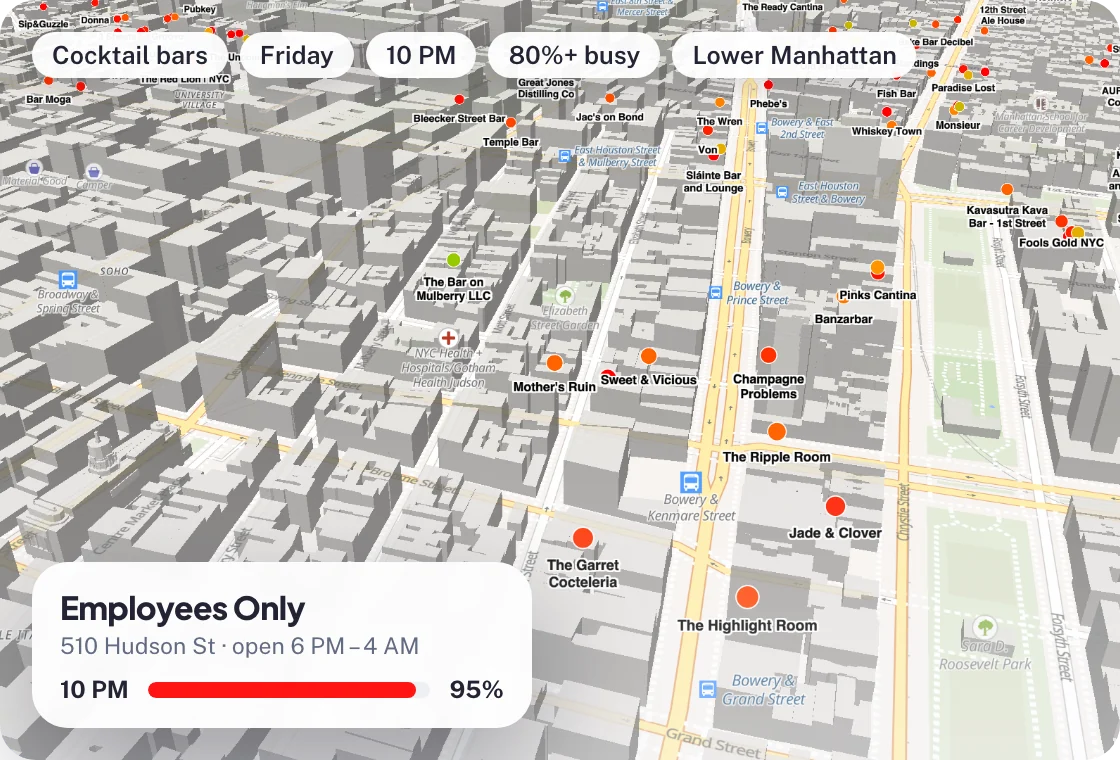 A busyness filter on a map: cocktail bars in Lower Manhattan that are 80% busy or more on Friday at 10 PM.
The filters you can combine
| Filter | Options | Use it to |
|---|---|---|
| Busyness | minimum, maximum, or both, from 0 to 100 | Find lively places or calm ones |
| Match mode | any selected hour, or all selected hours | Choose between "busy at some point" and "busy the whole time" |
| Day | Monday to Sunday | Plan for a specific day |
| Hours | a start and end hour within the day | Narrow to lunch, after work, late night |
| Day rank | how the day ranks in the venue's week, 1 to 7 | Find venues for which Saturday is their biggest day |
| Area | a point and radius, or a map box | Stay within walking distance or a district |
| Category | bar, club, restaurant, cafe, supermarket, museum, park, gym and many more | Keep one or more business types |
| Rating | 2.0 to 5.0 | Keep well-rated places |
| Reviews | minimum and maximum count | Favor established places, or find hidden ones |
| Price level | 1 (cheapest) to 5 | Match a budget |
| Your own groups | collections of venues you define | Filter "live music bars" or "our stores" |
Two details matter in practice:
- Dwell time is returned for each venue as a usual minimum and maximum visit length in minutes. You can sort by it, so places where people linger come first. It is not a filter on its own.
- The day runs from 6 AM to 5 AM. A Friday filter from 9 PM to 2 AM covers Friday night into Saturday morning.
Ten examples
Each example lists the filter values. In the API these map to Venue Filter parameters such as busy_min, busy_max, busy_conf, day_int, hour_min, hour_max, types, rating_min and price_max.
1. Busy bars on Friday night
A nightlife app wants places with energy. Bars and clubs, Friday, 9 PM to 11 PM, busyness 70 or more in any of those hours, sorted by the forecast at 10 PM.
| Setting | Value |
|---|---|
| Category | bars, clubs |
| Day, hours | Friday, 9 PM to 11 PM |
| Busyness | minimum 70, any hour |
| Sort | busiest at 10 PM first |
2. Bars that stay busy all evening
Same as above, but switch the match mode to "all hours" and widen the window to 8 PM to midnight. Only bars that keep up the pace for four hours remain. Good for "where to spend the whole night" lists.
3. Quiet museums on a weekday morning
A travel guide wants calm visits. Museums, Tuesday, 9 AM to 12 PM, busyness at most 40 in all hours, rating 4.5 or higher. Sort by reviews so famous places that happen to be calm rank first.
4. Quiet supermarkets on Sunday morning
Shoppers who dislike crowds. Supermarkets within 3 km of the user, Sunday, 8 AM to 11 AM, busyness at most 40 in all hours.
5. A calm lunch on a budget
Restaurants, Tuesday, 12 PM to 1 PM, busyness at most 40, rating 4.5 or higher, at least 200 reviews, price level 2 or lower. Useful for meeting planners and office apps.
6. Their biggest night of the week
Find bars for which Saturday is the busiest day: day Saturday, day rank 1. Then add busyness 80 or more from 10 PM to 1 AM. These are the places locals pick for a big night out.
7. Busy shopping streets for an ad campaign
A DOOH planner wants to schedule screens near shops when they are busiest. Shopping centers and shops in a city district, Saturday, 11 AM to 5 PM, busyness 60 or more in all hours. The venue locations show where the busy blocks are. More on this in optimizing DOOH with foot traffic signals.
8. Places where people stay longest
For an event sponsor who wants long exposure: parks, museums and attractions in an area, Sunday, 12 PM to 4 PM, busyness 50 or more, sorted by maximum dwell time. Central Park in New York, for example, usually keeps visitors up to 3 hours.
9. Quick stops
The reverse of the previous example: coffee shops near a station, on a weekday such as Wednesday, 7 AM to 9 AM, busyness 60 or more, sorted by shortest dwell time. Good for grab-and-go promotions.
10. Your own list of venues
Some groups do not exist as a category: bars with live music, venues with karaoke, your own store locations, a client's partner venues. Put them in a collection once, then filter it like any category: "live music bars at 60 or more on Thursday from 6 PM". The Venue Filter API tutorial shows how to create and combine collections.
Filtering without code
You do not need the API to try these filters.
- Free city guides. Each guide lists venues in a city and category with a week heatmap per venue. The URL accepts filters: busy bars in New York City on Friday night. The pattern is
/app/<Country>/<City>/<category>with the categories sightseeing, bar, restaurant, cafe and nightclub. - The map tool in your account. After a free signup, the map tool (Radar) offers all the filters above on a heatmap, with a timeline to step through the hours.
The introduction to BestTime's forecasting tools walks through both.
Filtering in your own product
The Venue Filter API returns the matching venues with their forecast for the selected hours, plus rating, reviews, price level, type, coordinates, opening hours and dwell time. That is enough to draw pins on a map, show a "busy at 10 PM" badge or rank a list.
A few practical tips:
- Start wide, then narrow. Begin with area, day and hours. Add busyness, then rating and price. If the result is empty, remove the last filter you added.
- Use "all hours" for promises. If your copy says "quiet all morning", use the all-hours match mode.
- Say what the number means. Label values as "usually busy" or "busier than usual for this place", not as crowd sizes.
- Cache per area and hour. Forecasts describe a typical week, so the same filter for the same area returns the same venues until the forecasts refresh.
To add venues that are not yet in BestTime, use Venue Search, which finds and forecasts venues from a query like "cocktail bars in Lower Manhattan".
Cost
A filter call costs 1 credit per 10 venues returned, so a list of 20 venues costs 2 credits. You can start with a free test account, no credit card needed. Basic Usage costs $29 per month including 1,200 credits, then $0.04 per credit. Pro Venues covers a fixed list of venues for a flat fee, from $96 per month for 50 venues to $249 for 1,000. See pricing.
Next steps
- Write the code with the Venue Filter API tutorial.
- See how bars use these filters in foot traffic for nightlife and bars.
- Compare data providers in the foot traffic data guide.
Questions
Can I filter businesses by how busy they are?
Yes. BestTime forecasts each venue's busyness for every hour of the week on a 0-100 scale. You can keep venues above or below a value on a chosen day and hours, for example bars at 70 or more on Friday from 9 PM to 11 PM.
What does busy mean in a foot traffic filter?
Busyness is relative to each venue's own busiest hour of the week. A filter of 70 or more keeps venues that are close to their usual peak. It is not a head count or a capacity measure.
Can I filter by dwell time?
BestTime returns the usual dwell time for each venue and can sort results by it. Use the sort to put places where people stay longest, or shortest, at the top.
Do I need to code to filter venues by foot traffic?
No. The free city guides and the map tool in your account offer the same filters. The API is for building them into your own product.
BestTime in 47 seconds
See how busy any place gets, hour by hour
BestTime forecasts how busy a venue gets for every hour of the week, from anonymized, aggregated phone location data combined with weather, events and holidays. Look up one venue, compare a whole city, or use the API.
Try BestTime for free
Create a free account without a credit card, forecast a few venues you know, and see their busy and quiet hours for every day of the week.
Start free See pricing