 BestTime
A city app can tell residents and visitors when a museum, park, market or shopping street is usually busy and when it is quiet. You add this with venue busyness forecasts: an hourly 0-100 score for every day of the week, per place. People then pick a better time to go, and visits spread more evenly across the day and across the city.
This guide covers the features a municipality can build, the API calls behind them and how to explain the data to residents.
The problem cities want to solve
Busy cities have the same few complaints:
- Crowding at the same places and times. Popular museums, parks and attractions are packed at the same hours every week.
- Places that are quieter than they need to be. Good local venues and public spaces stay half empty on weekday mornings.
- No way to check before leaving home. Residents find out a place is crowded when they arrive.
A city app that shows typical busyness before people set off helps with all three.
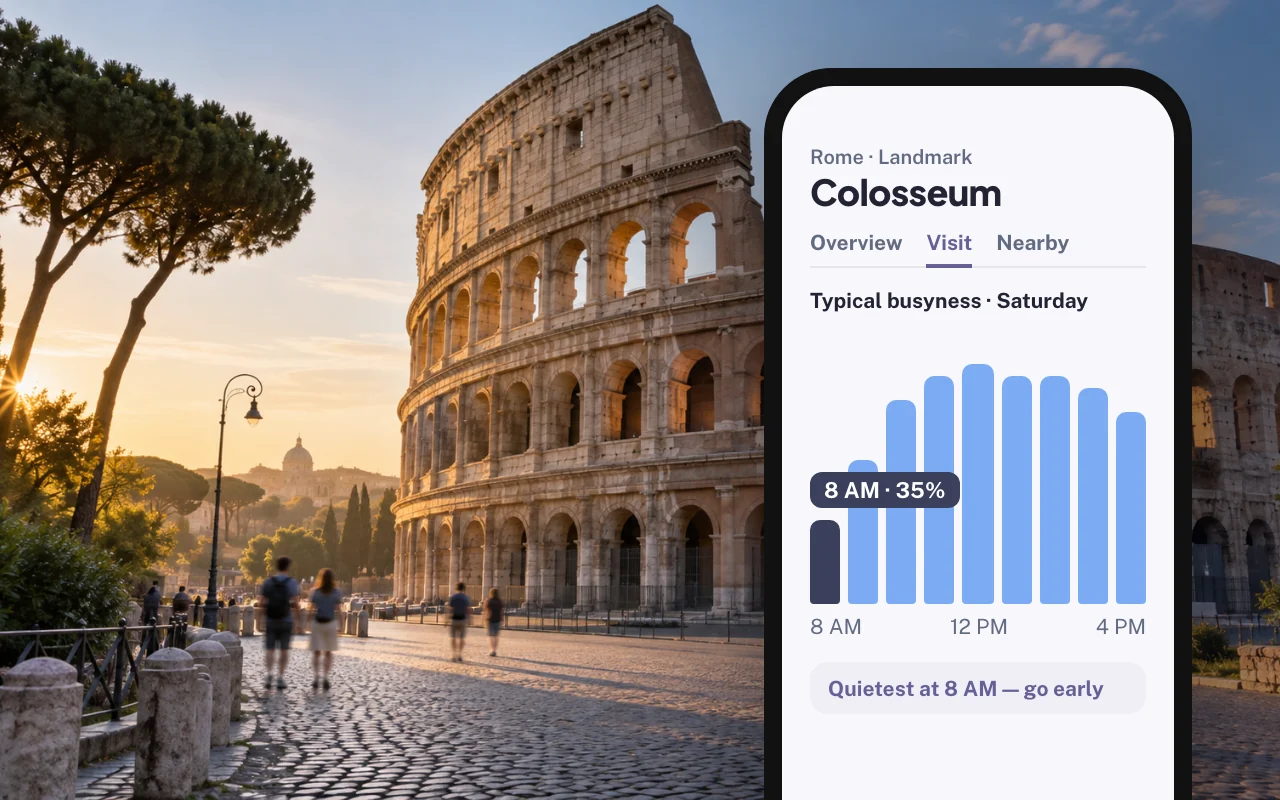
What the forecast data includes
BestTime forecasts how busy public venues are for each hour of the week. Forecasts are built from anonymized, aggregated phone location data combined with other real-world signals such as weather, events and holidays. The API returns patterns per venue. It does not return data about individual people.
For each venue you get:
- Hourly busyness from 0 to 100 for Monday through Sunday. 100 is that venue's own busiest hour of the week.
- Peak, busy and quiet hours per day.
- Dwell time, the typical length of a visit.
- Venue details such as type, address, rating and coordinates.
Coverage depends on the venue. Busy public places such as museums, parks, markets, shopping centers, stations and attractions usually have forecasts. Small offices with few visitors may not.
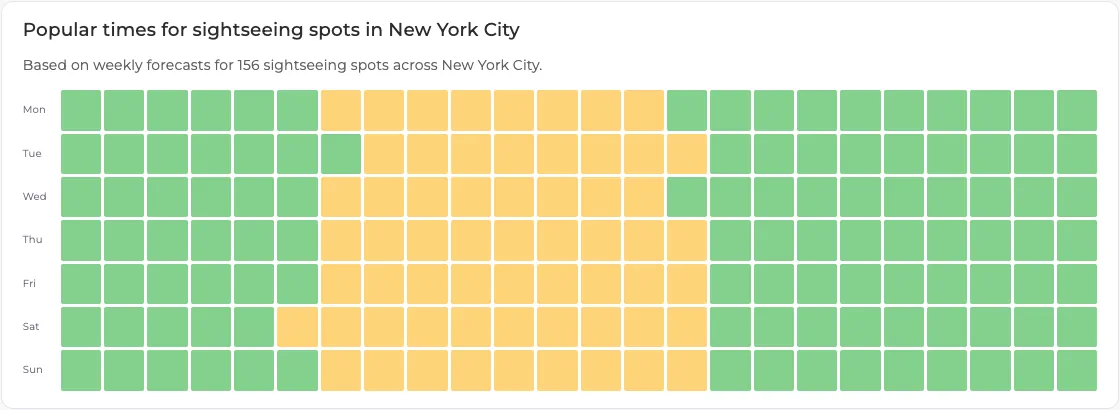 An aggregate week for 156 sightseeing spots in New York City. Quiet hours in green, busier hours in yellow.
Features for residents and visitors
Crowd-aware visitor information
Add a "best time to visit" block to every place in the app: the quietest hour today, the busiest hour, and a small week heatmap. Families can plan a zoo or park visit for a calmer morning. Tourists can see that a landmark is quieter at opening time.
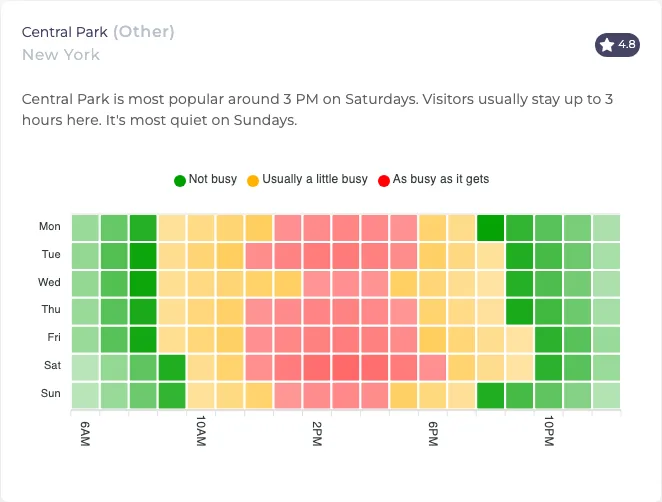 Central Park: busiest around 3 PM on Saturday. Visitors stay up to 3 hours.
Parks and outdoor spaces
Parks get crowded on warm weekend afternoons. Show which parks nearby are forecast to be quieter at the same hour, so people spread out without being told to stay away.
Events and city programs
When you plan a festival, market or free museum day, check the forecasts for the area first. You can avoid scheduling on top of an existing peak, or place the event on a day when the neighborhood is usually quiet. During the event, the app can point visitors to nearby places that are forecast to be calmer.
Public services and errands
Where public places such as libraries, markets and shopping streets have forecasts, show their quiet hours. Residents can plan errands for a calmer time. Only show this for places that have a forecast; don't guess for the rest.
Local business support
An app that shows quiet hours sends people to shops and cafes at times they have room. Cities that run "shop local" programs can combine this with offers during off-peak hours.
How to build it with the BestTime API
Most city apps need three building blocks.
1. Collect your city's places
- Use Venue Search to find places by a text query, such as "museums in Amsterdam" or "parks in Rotterdam". It returns matching venues with forecasts. See the Venue Search tutorial.
- For places you already know, send the name and address to the forecast endpoint (
POST /api/v1/forecasts). Save thevenue_idit returns. - Group venues into collections, for example "City museums", "Public parks" and "Markets". You can then filter by collection later.
2. Show lists and maps with the Venue Filter
The Venue Filter returns venues in an area that match types, a day, an hour range and a busyness range. This is the call behind "quiet museums near me on Sunday morning":
curl -X GET "https://besttime.app/api/v1/venues/filter?api_key_private=YOUR_PRIVATE_KEY&types=MUSEUM,PARK&busy_max=40&busy_conf=all&day_int=6&hour_min=9&hour_max=12&lat=52.3600&lng=4.8852&radius=3000&foot_traffic=both&limit=20"
day_intruns from 0 (Monday) to 6 (Sunday).busy_max=40withbusy_conf=allkeeps venues that stay at or below 40 in every hour of the window. The default,busy_conf=any, matches venues where at least one hour fits.- Use
collection_idsto limit results to your own curated lists.
Check the API documentation for all parameters. The Venue Filter tutorial has more examples.
3. Show detail pages with the query endpoints
When a user opens a place, load its week or day forecast by venue_id with the public key. For example, the day forecast for Sunday:
curl -X GET "https://besttime.app/api/v1/forecasts/day?api_key_public=YOUR_PUBLIC_KEY&venue_id=VENUE_ID&day_int=6"
The day response includes the hourly values plus peak_hours and quiet_hours, which you can show as plain text: "Usually quiet before 11 AM."
Explain the data clearly to residents
Residents will trust the app more if it is honest about what the numbers mean.
- Say what 100 means. "100% is this place's busiest hour of a typical week." It is not capacity and not a head count.
- Call it a forecast. The app shows typical patterns for each hour of the week. Use wording such as "usually busy" and "usually quiet".
- Use words and colors. Quiet, a little busy and busy, in green, yellow and red, read faster than numbers.
- Explain privacy. Add a short note that the data is anonymized and aggregated and does not track individuals.
Costs for a city-wide app
Forecasts describe a typical week, so they change slowly. Refresh them every few weeks and serve the app from a cache.
- Free test account, no credit card, to build a prototype.
- Basic Usage: $29 per month including 1,200 credits, then $0.04 per credit. A first forecast by name and address costs 2 credits; a refresh or query by venue ID costs 1 credit.
- Pro Venues for a fixed list of places with unlimited forecasts: $96 per month for 50 venues, $119 for 100, $149 for 500 and $249 for 1,000.
Most municipal apps work with a curated list of public places, which fits a Pro Venues plan. See the pricing page.
Next steps
Questions
How can a city app show how busy places are?
Connect the app to a venue busyness API such as BestTime. It returns an hourly 0-100 forecast for every day of the week, which the app can show as quiet and busy hours for each place.
Does the data track individual residents?
No. Forecasts are built from anonymized, aggregated phone location data combined with signals such as weather, events and holidays. The API returns venue-level patterns, not people.
Does a 100% busyness score mean a place is full?
No. 100 is the venue's own busiest hour of the week. It is not capacity and not a visitor count.
What does a city-wide app cost to run?
For a fixed list of places, Pro Venues plans give unlimited forecasts from $96 per month for 50 venues up to $249 per month for 1,000 venues. You can test for free first.
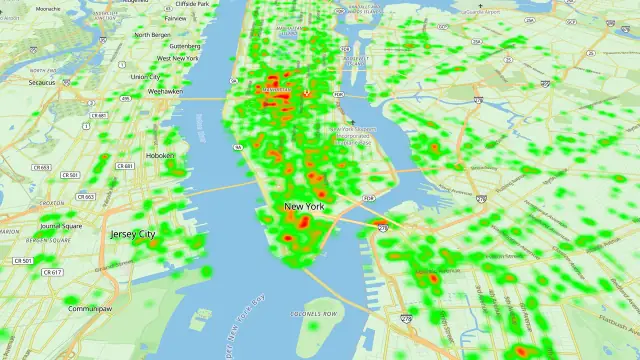
BestTime in 47 seconds
See how busy any place gets, hour by hour
BestTime forecasts how busy a venue gets for every hour of the week, from anonymized, aggregated phone location data combined with weather, events and holidays. Look up one venue, compare a whole city, or use the API.
Try BestTime for free
Create a free account without a credit card, forecast a few venues you know, and see their busy and quiet hours for every day of the week.
Start free See pricing